

Horizon Capture
Trent McDougall
Getting the latest details from the App Store…
Trent McDougall
Getting the latest details from the App Store…

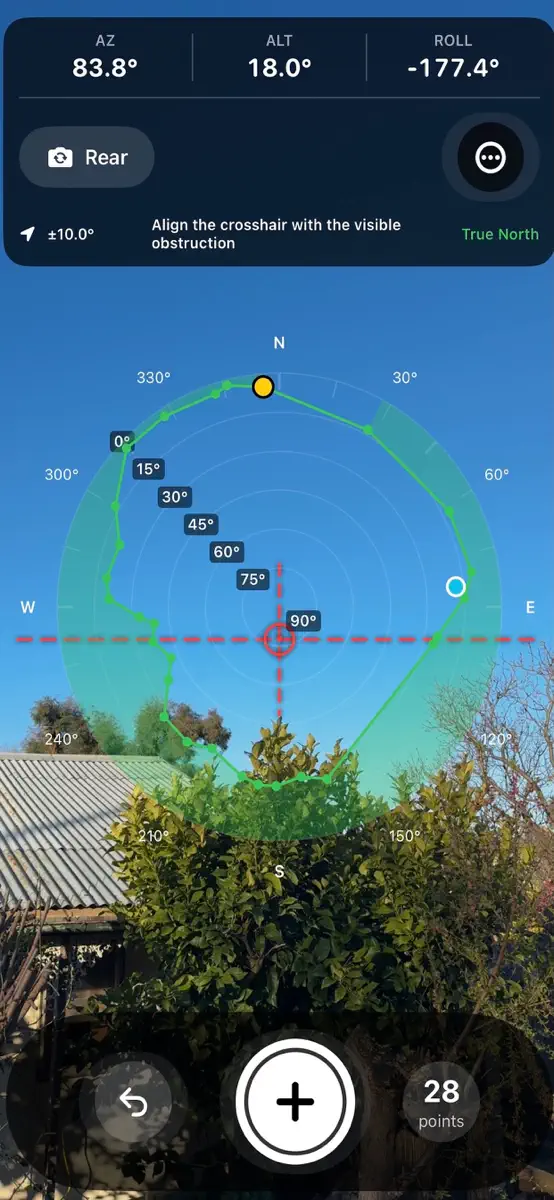
Use the camera and built-in motion sensors to sight along your local horizon and record the altitude and azimuth of surrounding obstructions such as trees, buildings, hills and observatory walls. As you capture points, Horizon Capture builds a live polar representation of your observing horizon so you can immediately see the profile taking shape. The first captured point is clearly identified, while a live position marker shows where the phone is currently pointing, making it easy to work…
Top of Paid · Utilities in Australia. Horizon Capture is #46 there. Changes are over 7 days.


How the app presents itself on the App Store. Select a screenshot to open it full size.
Version 1.8 · 5 Oct 2026 · 5 days ago
What’s New This update brings significant improvements to horizon capture, management and usability. Horizon Management * New Current Horizon and Saved Horizons workflow. * New dedicated Horizon selector for quickly switching between saved horizons. * Create a new horizon or import an existing horizon directly from the Horizon selector. * Save & Export now names the current horizon, saves it within Horizon Capture and creates a shareable HRZ or TXT file. * Added confirmation before replacing an existing saved horizon. * Improved horizon persistence and switching between saved horizons. Capture Improvements * Added Capture Spacing Guidance, providing a sound and haptic cue when you have moved the recommended angular distance from the previous point. * Recommended point spacing can be adjusted from 5° to 45°, with 15° as the default. * Point capture remains manual, allowing additional detail to be captured where the horizon changes rapidly. * Added optional sound and haptic feedback when capturing a point. * Azimuth is now displayed to two decimal places. Horizon Display * Added Mono and Rainbow horizon display modes. * Rainbow mode provides an altitude-based colour representation of the captured horizon. * Altitude labels correspond with the Rainbow altitude colours. * Display preferences are retained between sessions. Help & Usability * New illustrated in-app guide covering horizon capture, point spacing, the polar plot and horizon editing. * New first-run Getting Started guide introduces the basic capture workflow, with direct access to the full illustrated guide. * Added dedicated guidance explaining the horizon editing controls. * Horizon editing now uses a dedicated workspace without the camera view, making it clearer that existing horizon data is being adjusted. * Improved editing layout and control accessibility. * General interface, touch-target and usability improvements.
Every chart this app is in right now, best position first.
Higher on the chart is better: #1 is at the top.









| Chart | Rank | 24 h | 7 days | Best | Days on chart |
|---|---|---|---|---|---|
| Australia· Paid · Utilities | #46 | New entry | Change unknown | #46 | 1 |
Sign in to see 30 days, 90 days and all history.
Australia · Paid · Utilities: best #46, latest #46, over 7 snapshots since 8 Oct. No snapshots from 8 Oct to 9 Oct, on 9 Oct, on 10 Oct, and on 11 Oct; the line joins the snapshots on either side.
Entries, big moves, #1s and new versions we've recorded.

