

GPS カメラ 55 - 現場写真・調査
Kalimex-Consulting s.r.o. @Blocoware & Stanislav Dvoychenko
As of 4 Nov 2026, GPS カメラ 55 - 現場写真・調査 is #58 in Grossing · Navigation in Japan, its best of 4 chart positions across 4 countries. Over the last 7 days its biggest fall was 50 places, to #90 in Grossing · Navigation in Spain. Its best rank in the last 7 days was #39 in Grossing · Navigation in India.
Current rank
#58Japan · Grossing · Navigation
- Was
- —7 days ago
- Change
- Not enough history yetover 7 days
- Best
- #58in 7 days
- Longest chart run
- 28 daysBrazil · Grossing · Navigation
- New ratings, 7 days
- +1Mexico · since 25 Oct 2026
What's new
Version 5.4 · 1 month ago
■ Versión 5.4: calidad de foto corregida y exportaciones más pequeñas ‣ Corregido: en la versión 5.3, Media y Baja podían guardar fotos a tamaño completo en algunos iPhone. Las nuevas capturas vuelven a respetar la calidad elegida; las fotos guardadas mantienen su tamaño. ‣ Comparte copias más pequeñas de una foto guardada, puntos seleccionados o colecciones. Elige tamaño completo, un límite para el lado más largo o un límite de tamaño de archivo; las fotos guardadas no cambian. ‣ Para puntos o colecciones, consulta el número de fotos y el tamaño total estimado antes de compartir. Elige Con sello u Original para exportar imágenes; el KMZ con dibujos editables conserva los originales a tamaño completo. ■ También nuevo en la versión 5.3 ■ Cámara y vídeo ‣ En el visor, toca el indicador de zoom para elegir un objetivo o arrástralo para ajustar el zoom. ‣ Elige un retardo de disparo de 1, 3, 5 o 10 segundos para obtener capturas más estables. ‣ Bloquea el enfoque, ajústalo a mano o guarda una posición por objetivo, y deja que la cámara recuerde el último objetivo y el zoom. ‣ Para obtener fotos más claras con poca luz, abre Configuración > Ajustes de captura de fotos en la pantalla de la cámara y activa Priorizar la calidad con poca luz; mantén la cámara firme durante la captura. ‣ Asigna toques o pulsaciones largas en Controles del visor para hacer fotos o iniciar/detener video; configura Doble toque como Pantalla negra para ocultar el visor durante la grabación. ‣ Graba vídeo incluso en total oscuridad: en modo vídeo, toca el botón de linterna para encender la Luz de vídeo. Para ajustar su brillo del 25 % al 100 %, abre Configuración > Controles del visor en la pantalla de la cámara. ‣ En iPadOS 26 y 27, importantes optimizaciones del diseño del visor mantienen los controles de la cámara despejados, accesibles y bien situados en vertical, horizontal y ventanas redimensionadas. ■ Superposiciones de video ‣ Exporta superposiciones individuales de tus vídeos grabados para usarlas en otros proyectos, incluidos clips transparentes para tu editor de vídeo. ■ Transcripciones y subtítulos de vídeo ‣ En iOS 26 o posterior, transcribe vídeos en el dispositivo en idiomas compatibles, busca palabras pronunciadas y salta a las coincidencias, corrige, copia o comparte transcripciones, importa o exporta subtítulos SRT y muestra subtítulos durante la reproducción o en exportaciones con datos incrustados. ■ Puntos y registros fotográficos ‣ Las ediciones habituales siguen siendo sencillas. En el editor de puntos, abre Más y elige Avanzada en Vista para comparar valores de punto y foto, resolver conflictos y sincronizar metadatos compatibles.
Ranking events
- Dropped #54 → #98 in Grossing · NavigationMexico
- Entered the Grossing · Navigation chart at #58Japan
- Entered the Grossing · Navigation chart at #96Spain
- Climbed #91 → #54 in Grossing · NavigationMexico
- Dropped #53 → #91 in Grossing · NavigationMexico
- Climbed #92 → #53 in Grossing · NavigationMexico
Show 24 earlier events
- Dropped #61 → #88 in Grossing · NavigationIndia
- Dropped #61 → #92 in Grossing · NavigationMexico
- Climbed #78 → #39 in Grossing · NavigationIndia
- Dropped #40 → #71 in Grossing · NavigationSpain
- Entered the Grossing · Navigation chart at #39Mexico
- Entered the Grossing · Navigation chart at #40Spain
- Entered the Grossing · Navigation chart at #39India
- Entered the Grossing · Navigation chart at #89Australia
- Entered the Grossing · Navigation chart at #78Mexico
- Entered the Grossing · Navigation chart at #99Spain
- Entered the Grossing · Navigation chart at #100Germany
- Entered the Grossing · Navigation chart at #85Spain
- Climbed #85 → #46 in Grossing · NavigationBrazil
- Dropped #54 → #80 in Grossing · NavigationIndia
- Entered the Grossing · Navigation chart at #93Germany
- Entered the Grossing · Navigation chart at #13India
- Entered the Grossing · Navigation chart at #100Spain
- Entered the Grossing · Navigation chart at #80Mexico
- Entered the Grossing · Navigation chart at #65Germany
- Entered the Grossing · Navigation chart at #92Mexico
- Entered the Free · Navigation chart at #96Mexico
- Entered the Grossing · Navigation chart at #84Canada
- Climbed #68 → #22 in Grossing · NavigationBrazil
- Entered the Grossing · Navigation chart at #99Mexico
About
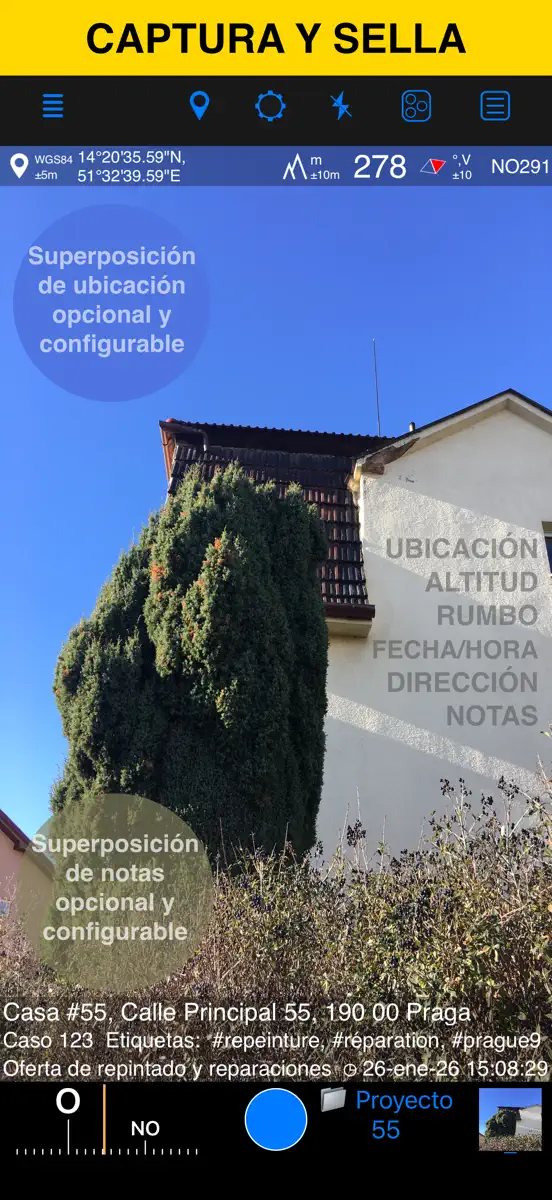
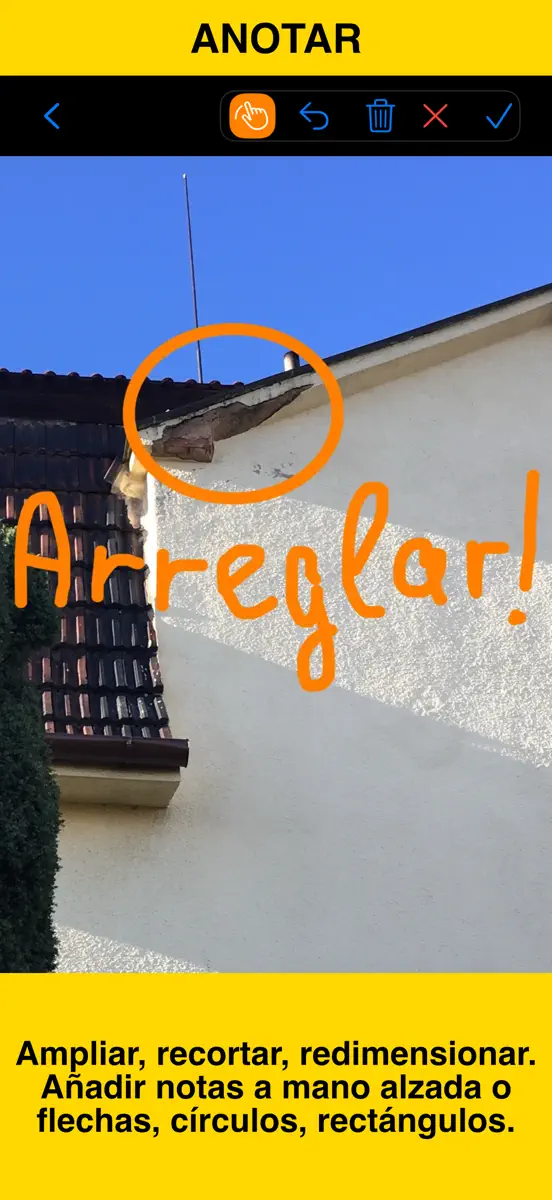
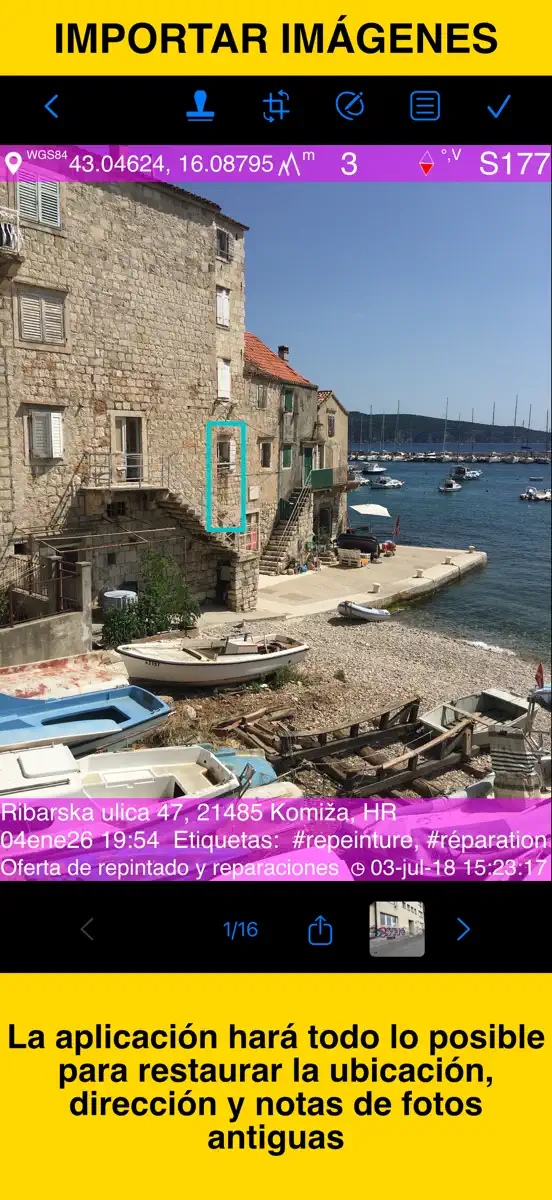
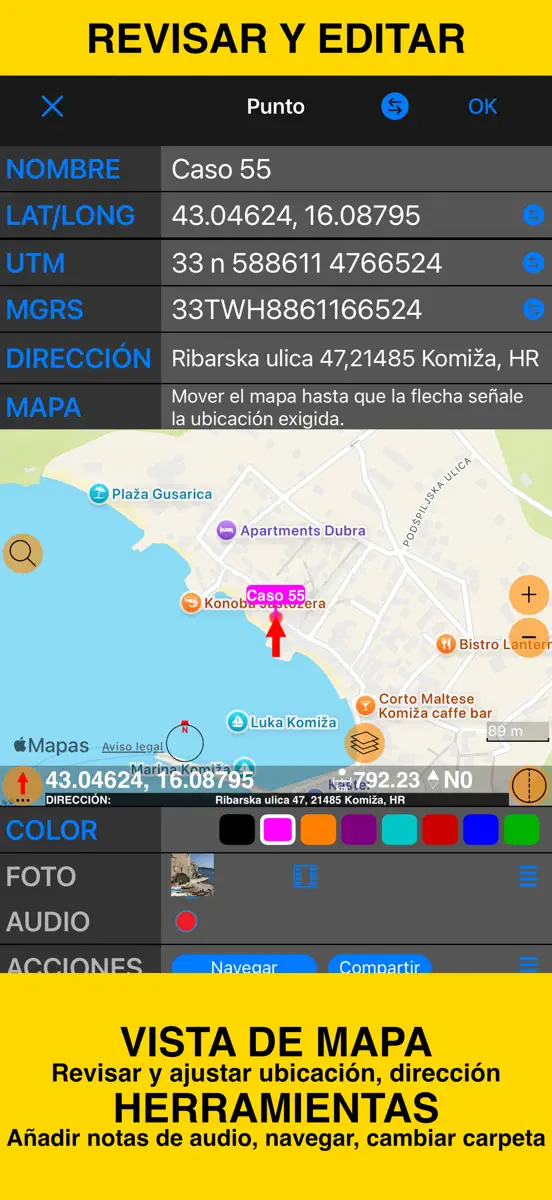
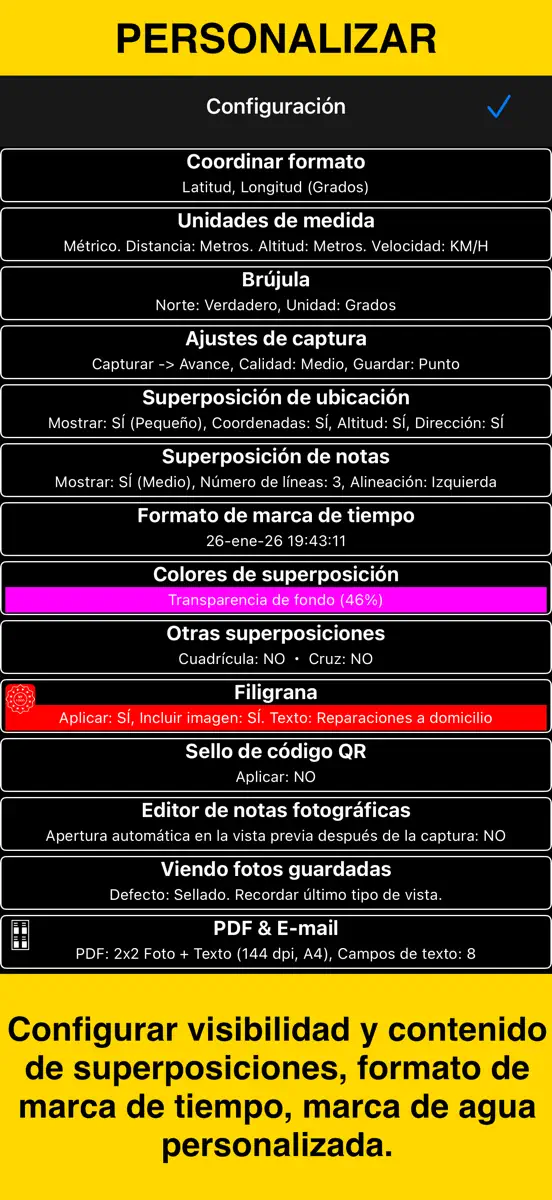
Capture fotos y vídeos con la ubicación precisa, la fecha, la dirección y sus notas superpuestas directamente. Añada anotaciones a mano a las fotos para realizar marcas rápidas sobre el terreno. Busque por título, etiquetas o notas, ordene por proximidad o fecha y organice las capturas en carpetas/colecciones. Importe fotos antiguas y restaure su ubicación, orientación y notas. SUPERPOSICIÓN DE UBICACIÓN Admite coordenadas decimales, DM, DMS, UTM y MGRS. Rumbo verdadero o magnético, en grados…
Ranks come from Apple's public App Store charts, checked once a day. Appulse Index isn't affiliated with Apple.
Rank history
Higher on the chart is better: #1 is at the top.
Sign in to see 30 days, 90 days and all history.
Japan · Grossing · Navigation: best #58, latest #58, over 7 snapshots since 29 Oct.
In 4 charts now
| Chart | Rank | 24 h | 7 days | Best | Days on chart |
|---|---|---|---|---|---|
| Japan· Grossing · Navigation · best #58 · 1 day | #58 | New entry | Not enough history yet | #58 | 1 |
| Brazil· Grossing · Navigation · best #22 · 28 days · 7 days Down 17 places | #68 | Down 4 places | Down 17 places | #22 | 28 |
| Spain· Grossing · Navigation · best #40 · 10 days · 7 days Down 50 places | #90 | Up 6 places | Down 50 places | #40 | 10 |
| Mexico· Grossing · Navigation · best #39 · 19 days | #98 | Down 44 places | Not enough history yet | #39 | 19 |
Competitors
Full chartTop of Grossing · Navigation in Japan. GPS カメラ 55 - 現場写真・調査 is #58 there. Changes are over 7 days.
- #1 (number one)Up 1 place
 トラックカーナビ by NAVITIME ナビタイムNAVITIME JAPAN CO.,LTD.
- #2Down 1 place
 NAVITIME(地図と乗換の総合ナビ)NAVITIME JAPAN CO.,LTD.
- #3No change
 カーナビタイム - CarPlay対応カーナビNAVITIME JAPAN CO.,LTD.
- #4No change
 乗換NAVITIME(電車乗り換え・バス乗り換え・時刻表)NAVITIME JAPAN CO.,LTD.
- #5No change
 ツーリングサポーター 原付バイク〜大型バイクまで使えるナビNAVITIME JAPAN CO.,LTD.
- #6No change
 ドライブサポーター by NAVITIME (カーナビ)NAVITIME JAPAN CO.,LTD.
- #7No change
 Yahoo!カーナビYahoo Japan Corporation
- #8Up 1 place
 ゼンリン地図ナビ 住宅地図/カーナビ/地図アプリ/トラックZENRIN DataCom CO.,LTD.
- #9Down 1 place
 バスNAVITIME 時刻表&乗り換え案内&路線図ナビNAVITIME JAPAN CO.,LTD.
- #10No change
 配達NAVITIME ゼンリン住宅地図/荷物管理/カーナビNAVITIME JAPAN CO.,LTD.
- #11Up 2 places
 渋滞情報マップbyNAVITIME 渋滞・通行止め・高速料金NAVITIME JAPAN CO.,LTD.
- #12Down 1 place
 Japan Transit Planner - TravelJorudan Co.,Ltd.
- #13Down 1 place
 Yahoo!乗換案内Yahoo Japan Corporation
- #14No change
 自転車NAVITIME-サイクリングナビと速度計測・マップNAVITIME JAPAN CO.,LTD.
- #15Up 1 place
 new pec smart株式会社マップル・オン
- #16Up 1 place
 バスカーナビ by ナビタイム - 大型バスの交通規制を考慮NAVITIME JAPAN CO.,LTD.
- #17Down 2 places
 ATIS交通情報(アティス)~リアルタイム渋滞情報Nihon Enterprise Co.,Ltd.
- #18No change
 auカーナビ Powered by NAVITIMEKDDI CORPORATION
- #19Up 1 place
 auナビウォークKDDI CORPORATION
- #20Up 2 places
 駅すぱあと-電車やバスなどの乗り換え案内、運行情報、時刻表もVal Laboratory Corporation
Screenshots



More from Kalimex-Consulting s.r.o. @Blocoware & Stanislav Dvoychenko
| App | Best rank now | Released | App Store |
|---|---|---|---|
 コンパス 55。地図・GPS・座標Navigation · | Grossing · NavigationJapan#72 | ||
 Taxímetro. GPS taximeter.Navigation · | Grossing · NavigationMexico#72 | ||
 土地測定 55 – 面積・距離を計算Navigation · | Not charting |
GPS カメラ 55 - 現場写真・調査
Kalimex-Consulting s.r.o. @Blocoware & Stanislav Dvoychenko
As of 4 Nov 2026, GPS カメラ 55 - 現場写真・調査 is #58 in Grossing · Navigation in Japan, its best of 4 chart positions across 4 countries. Over the last 7 days its biggest fall was 50 places, to #90 in Grossing · Navigation in Spain. Its best rank in the last 7 days was #39 in Grossing · Navigation in India.
Store listing
How the app presents itself on the App Store. Select a screenshot to open it full size.
App facts
What Apple publishes about this app. Ratings are from one country's App Store.
- Price
- Free
- Rating
- 4.8 / 5 stars813 ratings Mexico
- Released
- 6 Dec 2018
- Last update
- Version 5.4
- Requires
- iOS 15.6or later
- Size
- 95 MB
- Languages
- 11
Rank history
Higher on the chart is better: #1 is at the top.
Sign in to see 30 days, 90 days and all history.
Japan · Grossing · Navigation: best #58, latest #58, over 7 snapshots since 29 Oct.
Current rankings
Every chart this app is in right now, best position first.
| Chart | Rank | 24 h | 7 days | Best | Days on chart |
|---|---|---|---|---|---|
| Japan· Grossing · Navigation · best #58 · 1 day | #58 | New entry | Not enough history yet | #58 | 1 |
| Brazil· Grossing · Navigation · best #22 · 28 days · 7 days Down 17 places | #68 | Down 4 places | Down 17 places | #22 | 28 |
| Spain· Grossing · Navigation · best #40 · 10 days · 7 days Down 50 places | #90 | Up 6 places | Down 50 places | #40 | 10 |
| Mexico· Grossing · Navigation · best #39 · 19 days | #98 | Down 44 places | Not enough history yet | #39 | 19 |
Ranking events
Entries, big moves, #1s and new versions we've recorded, by day.
- Dropped #54 → #98 in Grossing · NavigationMexico
- Entered the Grossing · Navigation chart at #58Japan
- Entered the Grossing · Navigation chart at #96Spain
- Climbed #91 → #54 in Grossing · NavigationMexico
- Dropped #53 → #91 in Grossing · NavigationMexico
- Climbed #92 → #53 in Grossing · NavigationMexico
- Dropped #61 → #88 in Grossing · NavigationIndia
- Dropped #61 → #92 in Grossing · NavigationMexico
- Climbed #78 → #39 in Grossing · NavigationIndia
- Dropped #40 → #71 in Grossing · NavigationSpain
- Entered the Grossing · Navigation chart at #39Mexico
- Entered the Grossing · Navigation chart at #40Spain
- Entered the Grossing · Navigation chart at #39India
- Entered the Grossing · Navigation chart at #89Australia
- Entered the Grossing · Navigation chart at #78Mexico
- Entered the Grossing · Navigation chart at #99Spain
- Entered the Grossing · Navigation chart at #100Germany
- Entered the Grossing · Navigation chart at #85Spain
- Climbed #85 → #46 in Grossing · NavigationBrazil
- Dropped #54 → #80 in Grossing · NavigationIndia
- Entered the Grossing · Navigation chart at #93Germany
- Entered the Grossing · Navigation chart at #13India
- Entered the Grossing · Navigation chart at #100Spain
- Entered the Grossing · Navigation chart at #80Mexico
- Entered the Grossing · Navigation chart at #65Germany
- Entered the Grossing · Navigation chart at #92Mexico
- Entered the Free · Navigation chart at #96Mexico
- Entered the Grossing · Navigation chart at #84Canada
- Climbed #68 → #22 in Grossing · NavigationBrazil
- Entered the Grossing · Navigation chart at #99Mexico
Competitors
Full chartTop of Grossing · Navigation in Japan. GPS カメラ 55 - 現場写真・調査 is #58 there. Changes are over 7 days.
- #1 (number one)Up 1 placeトラックカーナビ by NAVITIME ナビタイムNAVITIME JAPAN CO.,LTD.
- #2Down 1 placeNAVITIME(地図と乗換の総合ナビ)NAVITIME JAPAN CO.,LTD.
- #3No changeカーナビタイム - CarPlay対応カーナビNAVITIME JAPAN CO.,LTD.
- #4No change乗換NAVITIME(電車乗り換え・バス乗り換え・時刻表)NAVITIME JAPAN CO.,LTD.
- #5No changeツーリングサポーター 原付バイク〜大型バイクまで使えるナビNAVITIME JAPAN CO.,LTD.
- #6No changeドライブサポーター by NAVITIME (カーナビ)NAVITIME JAPAN CO.,LTD.
- #7No changeYahoo!カーナビYahoo Japan Corporation
- #8Up 1 placeゼンリン地図ナビ 住宅地図/カーナビ/地図アプリ/トラックZENRIN DataCom CO.,LTD.
- #9Down 1 placeバスNAVITIME 時刻表&乗り換え案内&路線図ナビNAVITIME JAPAN CO.,LTD.
- #10No change配達NAVITIME ゼンリン住宅地図/荷物管理/カーナビNAVITIME JAPAN CO.,LTD.
- #11Up 2 places渋滞情報マップbyNAVITIME 渋滞・通行止め・高速料金NAVITIME JAPAN CO.,LTD.
- #12Down 1 placeJapan Transit Planner - TravelJorudan Co.,Ltd.
- #13Down 1 placeYahoo!乗換案内Yahoo Japan Corporation
- #14No change自転車NAVITIME-サイクリングナビと速度計測・マップNAVITIME JAPAN CO.,LTD.
- #15Up 1 placenew pec smart株式会社マップル・オン
- #16Up 1 placeバスカーナビ by ナビタイム - 大型バスの交通規制を考慮NAVITIME JAPAN CO.,LTD.
- #17Down 2 placesATIS交通情報(アティス)~リアルタイム渋滞情報Nihon Enterprise Co.,Ltd.
- #18No changeauカーナビ Powered by NAVITIMEKDDI CORPORATION
- #19Up 1 placeauナビウォークKDDI CORPORATION
- #20Up 2 places駅すぱあと-電車やバスなどの乗り換え案内、運行情報、時刻表もVal Laboratory Corporation
- #58New entryGPS カメラ 55 - 現場写真・調査This app
About
From the app's App Store listing.
Capture fotos y vídeos con la ubicación precisa, la fecha, la dirección y sus notas superpuestas directamente. Añada anotaciones a mano a las fotos para realizar marcas rápidas sobre el terreno. Busque por título, etiquetas o notas, ordene por proximidad o fecha y organice las capturas en carpetas/colecciones. Importe fotos antiguas y restaure su ubicación, orientación y notas.
SUPERPOSICIÓN DE UBICACIÓN Admite coordenadas decimales, DM, DMS, UTM y MGRS. Rumbo verdadero o magnético, en grados…
What's new
Version 5.4 · 27 Sep 2026 ·
■ Versión 5.4: calidad de foto corregida y exportaciones más pequeñas
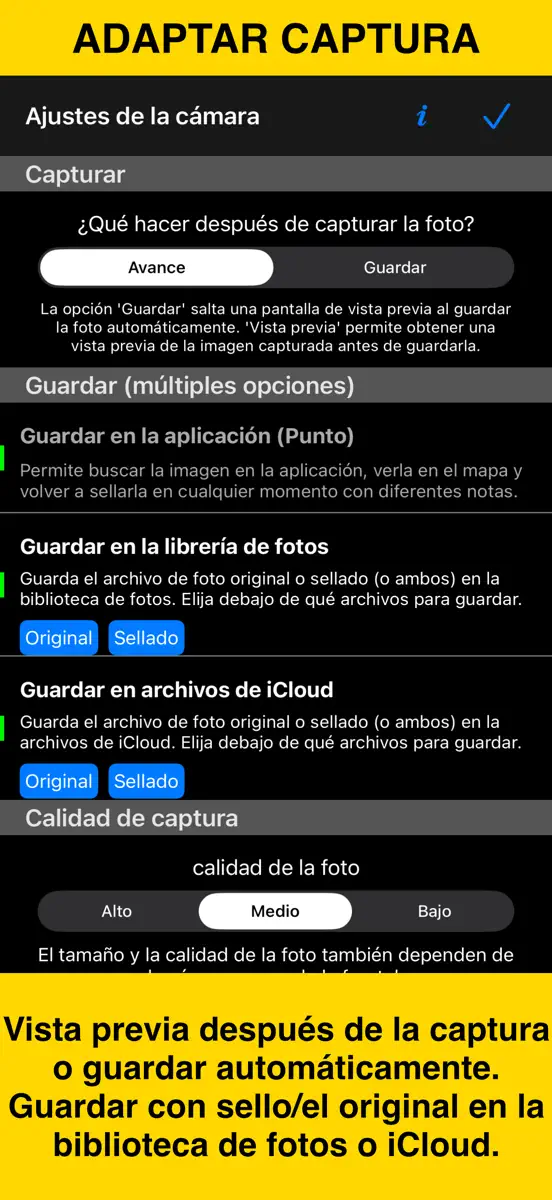
- Corregido: en la versión 5.3, Media y Baja podían guardar fotos a tamaño completo en algunos iPhone. Las nuevas capturas vuelven a respetar la calidad elegida; las fotos guardadas mantienen su tamaño.
- Comparte copias más pequeñas de una foto guardada, puntos seleccionados o colecciones. Elige tamaño completo, un límite para el lado más largo o un límite de tamaño de archivo; las fotos guardadas no cambian.
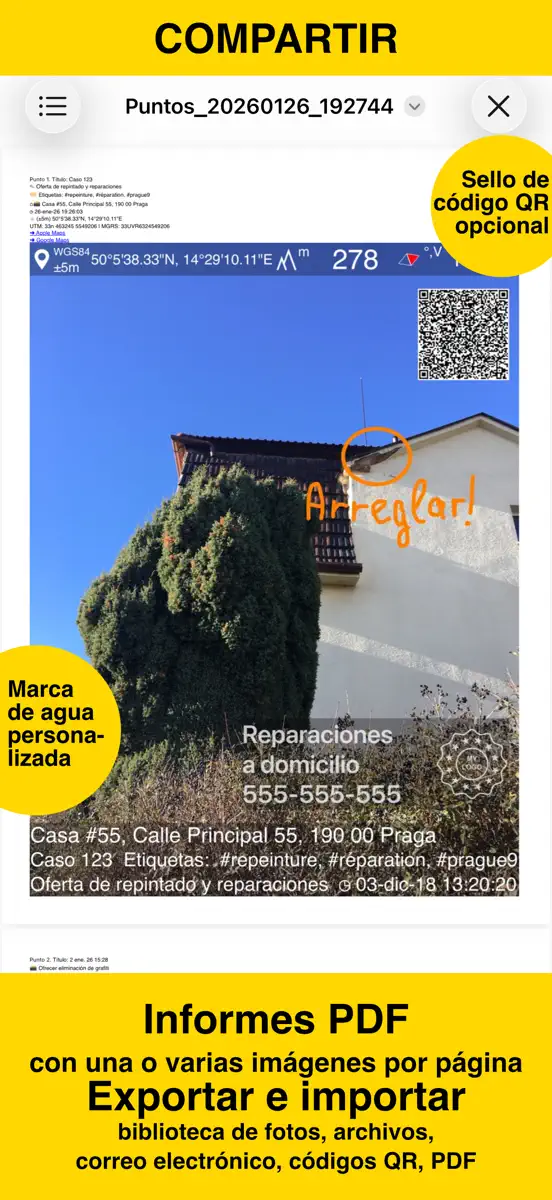
- Para puntos o colecciones, consulta el número de fotos y el tamaño total estimado antes de compartir. Elige Con sello u Original para exportar imágenes; el KMZ con dibujos editables conserva los originales a tamaño completo.
■ También nuevo en la versión 5.3 ■ Cámara y vídeo
- En el visor, toca el indicador de zoom para elegir un objetivo o arrástralo para ajustar el zoom.
- Elige un retardo de disparo de 1, 3, 5 o 10 segundos para obtener capturas más estables.
- Bloquea el enfoque, ajústalo a mano o guarda una posición por objetivo, y deja que la cámara recuerde el último objetivo y el zoom.
- Para obtener fotos más claras con poca luz, abre Configuración > Ajustes de captura de fotos en la pantalla de la cámara y activa Priorizar la calidad con poca luz; mantén la cámara firme durante la captura.
- Asigna toques o pulsaciones largas en Controles del visor para hacer fotos o iniciar/detener video; configura Doble toque como Pantalla negra para ocultar el visor durante la grabación.
- Graba vídeo incluso en total oscuridad: en modo vídeo, toca el botón de linterna para encender la Luz de vídeo. Para ajustar su brillo del 25 % al 100 %, abre Configuración > Controles del visor en la pantalla de la cámara.
- En iPadOS 26 y 27, importantes optimizaciones del diseño del visor mantienen los controles de la cámara despejados, accesibles y bien situados en vertical, horizontal y ventanas redimensionadas.
■ Superposiciones de video
- Exporta superposiciones individuales de tus vídeos grabados para usarlas en otros proyectos, incluidos clips transparentes para tu editor de vídeo.
■ Transcripciones y subtítulos de vídeo
- En iOS 26 o posterior, transcribe vídeos en el dispositivo en idiomas compatibles, busca palabras pronunciadas y salta a las coincidencias, corrige, copia o comparte transcripciones, importa o exporta subtítulos SRT y muestra subtítulos durante la reproducción o en exportaciones con datos incrustados.
■ Puntos y registros fotográficos
- Las ediciones habituales siguen siendo sencillas. En el editor de puntos, abre Más y elige Avanzada en Vista para comparar valores de punto y foto, resolver conflictos y sincronizar metadatos compatibles.
More from Kalimex-Consulting s.r.o. @Blocoware & Stanislav Dvoychenko
Their other apps that Appulse has seen in the charts, charting ones first.
| App | Best rank now | Released | App Store |
|---|---|---|---|
コンパス 55。地図・GPS・座標Navigation · | Grossing · NavigationJapan#72 | ||
Taxímetro. GPS taximeter.Navigation · | Grossing · NavigationMexico#72 | ||
土地測定 55 – 面積・距離を計算Navigation · | Not charting |
Ranks come from Apple's public App Store charts, checked once a day. Appulse Index isn't affiliated with Apple.