

Current rank
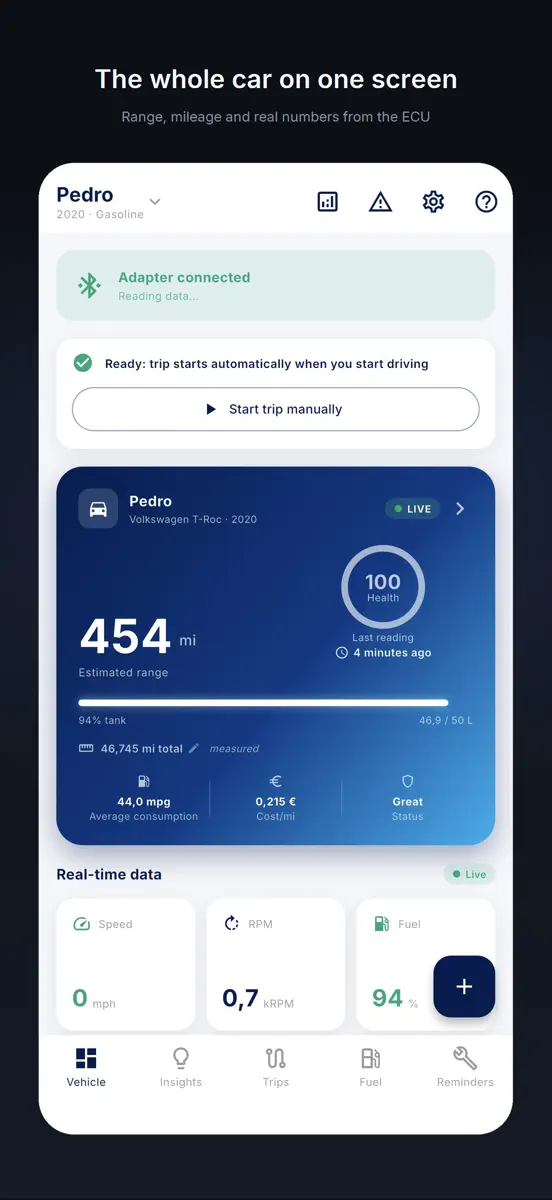
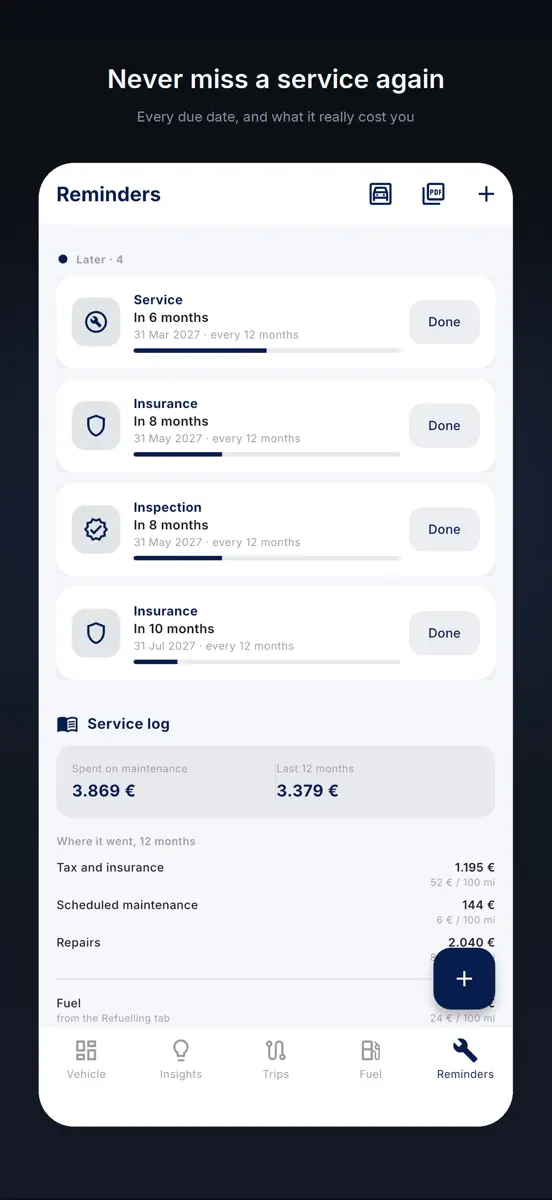
DrivePulse connects to your car's OBD2 socket through an ELM327 adapter and keeps your trips, fuel use, costs, deadlines and diagnostics on your phone. The home screen shows where you parked, the battery status, your range, what you have spent and how your last trip went. Car, motorbike or scooter: one profile each, with separate data. WORK TRIPS (new) Mark which trips are for work and the app prepares the report: odometer, distance, expenses and receipts, per trip or per period, in PDF and…
Competitors
Full chartTop of Grossing · Navigation in Brazil. DrivePulse: Scanner Automotivo is #96 there. Changes are over 7 days.
- #1 (number one)No change
 Radarbot: Speed Camera GPS AppIteration Mobile S.L
 - #2No change
 Spoke Route PlannerCircuit Routing
 - #3No change
 Moovit: Bus & Transit TrackerMoovit App Global LTD
 - #4No change
 Navionics® BoatingGarmin
 - #5Up 1 place
 Wikiloc - Trails of the WorldWikiloc Outdoor SL
 - #6Down 1 place
 MapXplorer: GPS Maps & RadarGoldlab Applications Yazilim Bilişim Anonim Şirketi
 - #7No change
 Avenza Maps: Offline MappingAvenza Systems Inc.
 - #8No change
- #9No change
 Car Play Connect: Auto SyncVALERY STAKARSKI
 - #10Up 3 places
 Famio: Find My Family, FriendsGismart Limited
 - #11Up 33 places
 Gaia GPS: Mobile Trail MapsTrailBehind
 - #12No change
 GPS Speedometer HUD: SpeedAceChangsha Liangchao Technology Co., Ltd.
 - #13Up 4 places
 Zeo Route PlannerExpronto Technologies Inc.
 - #14Up 13 places
 Speedometer GPS: Speed MonitorDuyou Technology Co., Limited
 - #15Down 4 places
 Standort Teilen: Handy OrtenRU ART AND DESIGN LLC
 - #16Up 5 places
 衛星地図 - 衛星写真・3Dマップ・ストリートビューAnkagis
 - #17Down 3 places
- #18Up 2 places
 GPS Speedometer MPH TrackerBITHAUS.TECH, UNIPESSOAL LDA
 - #19No change
 Cittamobi: Ônibus e TrilhosCittamobi Desenvolvimento em Tecnologia Ltda
 - #20Up 4 places
 Tractor GPS - Field GuidanceOran Dynamics Ltd


Store listing
How the app presents itself on the App Store. Select a screenshot to open it full size.






What's new
Version 3.5.6 · 12 Oct 2026 · 9 days ago
DrivePulse reads your car through an OBD2 adapter: fault codes explained in plain words, real fuel consumption, engine health and every trip on a map. No account, no server: your data stays on your phone. What's new in this version: • Custom PIDs. Add readings the app doesn't know (command, formula and unit) and test them on the connected car, starting from a larger community database that isn't verified. Each trip shows the minimum, average and maximum of the PIDs you record, and you can import PID lists from a CSV file. • Home Assistant, if you use it. The app can send it the start and end of each trip, with fuel, distance, voltage and trouble codes, plus live values if you want them, straight from your phone. It's off by default, and the help starts with installing through HACS. When the free trial ends, automatic sending pauses until you unlock the app. • Start/Stop no longer splits the trip. A long stop with the engine off, at a level crossing or in traffic, no longer ends it while the car's control unit stays awake; and if it had ended, setting off again within a few minutes and a short distance continues the same trip. • Eco score trusts real consumption. A surge with the pedal held still no longer counts as harsh driving, and where the car measures consumption, surges and braking weigh less if you used less than expected. New trips only. • Every trip with its type: commute, personal, travel or business. After a few identical routes the app suggests it, but never fills it in on its own. • Hybrids and electric cars, counted right. The Plug-in hybrid profile counts fuel only on the distance driven on fuel. Electric cars no longer end the trip at traffic lights, and a hybrid running on electric, or an electric car that doesn't report revs, no longer disconnects mid-trip. • Quiet when parked. With the car parked the app doesn't connect on its own, and after a trip, walking away with your phone no longer wakes the car: on some cars that could set off the alarm. A button on the main screen connects when you choose. • The iOS 26 glass effect, off by default: translucent bars and cards in the app, the widget and Live Activities, now on every main screen. Also: • Fill-ups from Road Trip MPG, and the fill-up does the math. • The right fuel level on cars that count in half litres. • Adapters that skip answers get a slower pace, remembered per car. • Adapters with an unfamiliar name get a fair try. • Cars that answer late get asked again. • Range reads in full on CarPlay. • Connection messages that tell the truth. • Plausible hybrid range. • Eco score, only if you want it. • Battery voltage even without the car's reading. • Particulate filter, GPS distance and climbs read with more care. • Currency and units from your region.
Current rankings
Every chart this app is in right now, best position first.
| Chart | Rank | 24 h | 7 days | Best | Days on chart |
|---|---|---|---|---|---|
| Brazil· Grossing · Navigation · best #96 · 1 day | #96 | New entry | Change unknown | #96 | 1 |
Rank history
Higher on the chart is better: #1 is at the top.
Sign in to see 30 days, 90 days and all history.
Not enough history yet
The chart fills in as new snapshots arrive (once a day).
Ranking events
Entries, big moves, #1s and new versions we've recorded.
- Entered the Grossing · Navigation chart at #96Brazil
- Entered the Grossing · Navigation chart at #42India