

As of 8 Nov 2026, Apricity: Lector PDF y EPUB is #59 in Grossing · Books in Spain, the one tracked chart it's in.
Current rank
#59Spain · Grossing · Books
- Was
- —7 days ago
- Change
- Not enough history yetover 7 days
- Best
- #59in 7 days
- Longest chart run
- 1 daySpain · Grossing · Books
- New ratings, 7 days
- —Needs a week of rating history
What's new
Version 2.0.0 · 20 days ago
Your books read aloud in the car with CarPlay, pens that write like ink on paper, and your tools down the side of a page that fills the screen. NEW • Listen in the car with CarPlay: choose a book on the car's screen and it reads on from where you left off. • On the car's screen, skip between chapters and change the reading speed without reaching for your phone. • Kokoro reads in eight languages, with 54 voices: English, Spanish, French, Hindi, Italian, Portuguese, Japanese and Chinese. • The book you were listening to waits at the foot of the bookshelf, ready to go on in a tap, even after the app has been closed. • Choose how far Back and Forward skip, from 10 seconds to a minute, by holding the buttons in the player. • Send the reading to an AirPlay speaker from the player. • Kokoro's voices have faces: a portrait beside each as you choose, and the face of the one reading in the player. • Choose the voice from the player, next to AirPlay. • Your pens finish each stroke the way ink does on paper: a little heavier where you press, and running out to a point as the pen lifts. • Every pen has a panel of its own: how its ends taper, how it answers pressure, its thickness and darkness, with a sample stroke. • Highlighters can lay down dots or dashes, and rule themselves straight. • Lined, dotted and squared paper can have lines in a colour and spacing of your choosing. • The paper itself, and its lines, can be any colour you like. • New notebooks start on pages the shape of your screen, so the page fills it edge to edge. • Apple's own pen palette, if you prefer it: switch it on under More. • Scroll or turn past the last page and a fresh one is waiting. IMPROVED • The tools stand down a rail at the side of the page, and the page runs the whole height of the screen. One tap folds the rail away. • Lines on the paper stay crisp however far out you zoom. • Starting a notebook is simpler: cover and first page side by side, and the paper's colour, lines and spacing to hand. • Kokoro's British voices speak with British pronunciation. • Play, Back and Forward answer at once: Kokoro keeps what it has just read, and begins a long sentence while the rest is made. • Kokoro is ready as a book opens, so the first tap on Listen isn't a wait. • Trying a voice pauses the book, which goes on when the sample ends. • Under their names: Heart is Kokoro's best, Nicole whispers, and the three Santas are who you'd think. • Come back from a pause and the voice starts its sentence again; after a long break, the one before it too. • When the sleep timer runs out, the voice finishes its sentence before it stops. • Kokoro's voices fade out gently as you pause, and back in as you play. • Kokoro's voices keep downloading while you use another app, and a download that stops carries on from where it got to. • On iPhone, typing past the foot of a page carries on at the top of the next. • A pen set lighter stays that shade where strokes cross, or where you go over a letter. • Neat Writing and tapered ends settle a word at a time as you pause, never under the pen. • Ink follows the paper under your pen, so it shows on a dark page beside a light one. • The pen panel's sample stroke is as thick as the line it draws on the page. FIXED • On iPhone, the keyboard stays up when you start typing in a text box. • Light ink no longer turns dark a moment after you lift the pen. • A line snapped straight no longer leaves the line you drew beside it. • A stroke you undo no longer comes back when you write again. • A stroke written just as a page is added or synced is no longer lost. • The preview of a shape you hold to snap shows in your own ink, not black. • Arrows no longer have a darker tip in a light pen or a highlighter. • In the zoom window, the box moves on as soon as you write into the margin. • If a Kokoro voice can't start, an Apple voice reads on rather than leaving you in silence. Thanks for reading with Apricity.
Ranking events
- Entered the Grossing · Books chart at #59Spain
- New version 2.1.0 (was 2.0.0)
- Entered the Free · Books chart at #80India
About
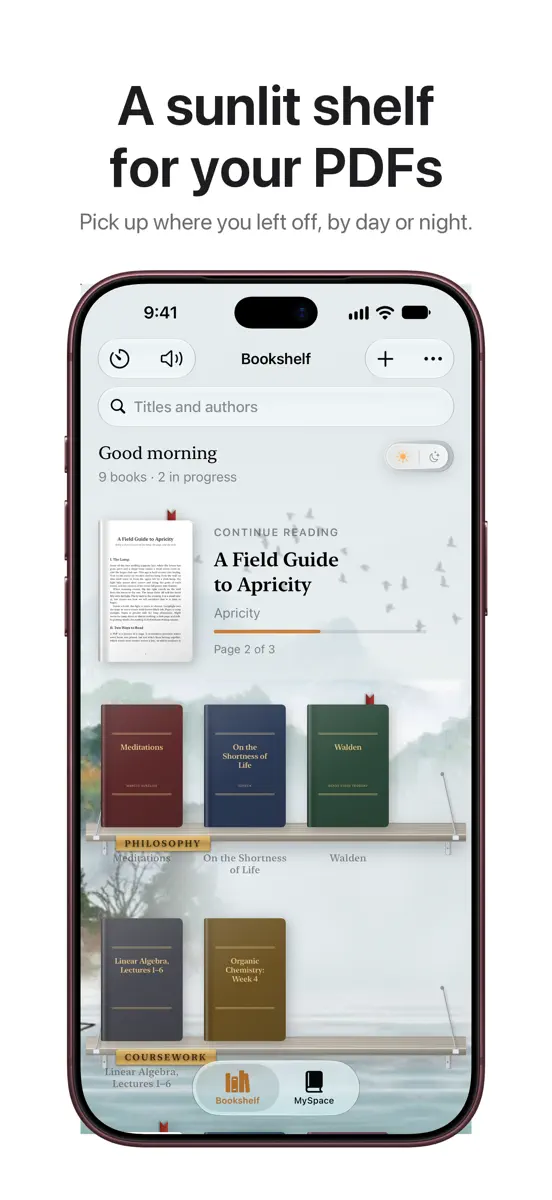
Apricity (n.): the warmth of the sun on a winter's day. Some of the best reading happens late, when the house has gone quiet and a single lamp makes a small warm room inside the dark. Apricity is built around that feeling: a reading room for the PDFs and EPUBs you already have, and a desk for the notes you make from them. YOUR BOOKS, ON REAL SHELVES Add a PDF or EPUB and it stands on a wooden shelf, lit by a lamp at night and daylight by morning. Name your shelves and move books around…
Ranks come from Apple's public App Store charts, checked once a day. Appulse Index isn't affiliated with Apple.
Rank history
Higher on the chart is better: #1 is at the top.
Sign in to see 30 days, 90 days and all history.
Spain · Grossing · Books: best #59, latest #59, over 7 snapshots since 2 Nov.
In 1 chart now
| Chart | Rank | 24 h | 7 days | Best | Days on chart |
|---|---|---|---|---|---|
| Spain· Grossing · Books · best #59 · 1 day | #59 | New entry | Not enough history yet | #59 | 1 |
Competitors
Compare with the top 3Full chartTop of Grossing · Books in Spain. Apricity: Lector PDF y EPUB is #59 there. Changes are over 7 days.
- #1 (number one)No change
 Audible: Audiobooks & PodcastsAudible, Inc.
- #2Up 1 place
 Storytel - Audiobooks LibraryStorytel Sweden AB
- #3Down 1 place
- #4No change
 BueNovela - leer novela libroSINGAPORE NEW READING TECHNOLOGY PTE. LTD.
- #5Up 2 places
 Litres: Books and audiobooksLitRes OOO
- #6Up 3 places
 Wattpad - Read & Write StoriesWattpad Corp
- #7Up 1 place
 MistbookLaia Vidal
- #8Up 2 places
 GoodNovel - Booktok, StoriesSINGAPORE NEW READING TECHNOLOGY PTE. LTD.
- #9New entry
 Chérubins : Histoires audioLes Fils du Tonnerre
- #10Up 3 places
- #11Up 5 places
 MyBook: books and audiobooksZhivaya Biblioteka OOO
- #12Up 26 places
 Janitor: Interactive StoriesJanitorAI
- #13Down 8 places
 MAGNIFICAT (edición española)Magnificat, Inc.
- #14Up 4 places
 Manobook: My Good Story ReaderCHANGDU (HK) TECHNOLOGY LIMITED
- #15Up 12 places
 AlphaNovel - Novels & StoriesBrailion Ventures Limited
- #16Down 4 places
 Litres: AudioLitRes OOO
- #17Up 5 places
 PocketBook ReaderPocketbook International SA
- #18Up 6 places
 Dreame - Read Best RomanceSTARY PTE. LTD.
- #19Up 1 place
 WebNovel - Read Novels & MangaCloudary Holdings Limited
- #20Down 14 places
 Flashbook: 本の要約Flitsboek


Screenshots


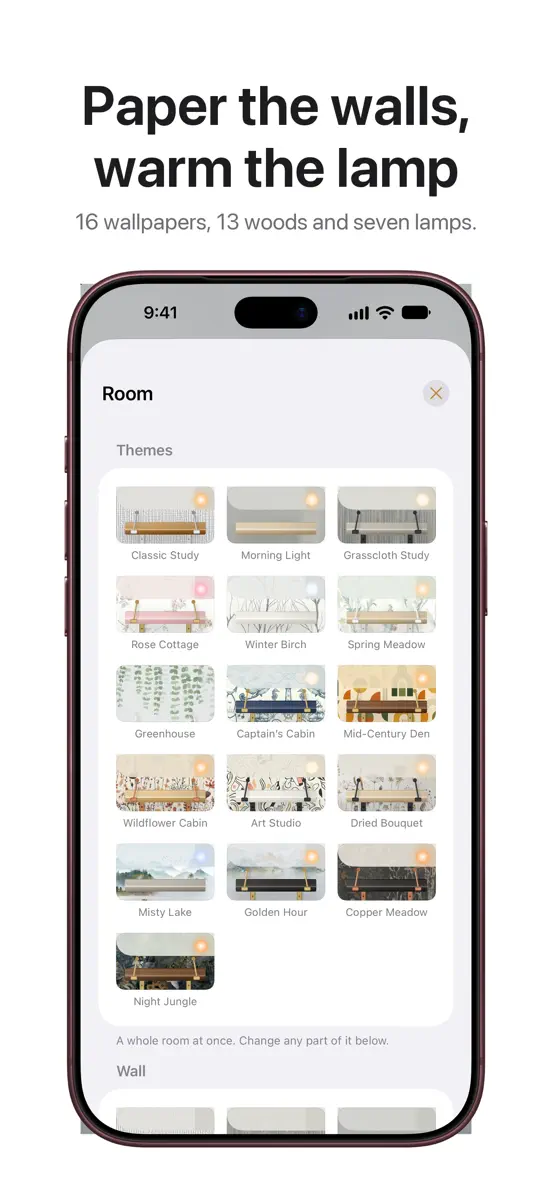

As of 8 Nov 2026, Apricity: Lector PDF y EPUB is #59 in Grossing · Books in Spain, the one tracked chart it's in.
Store listing
How the app presents itself on the App Store. Select a screenshot to open it full size.
App facts
What Apple publishes about this app. Ratings are from one country's App Store.
- Price
- Free
- Released
- 16 Oct 2026
- Last update
- Version 2.0.0
- Requires
- iOS 26.0or later
- Size
- 59.3 MB
- Languages
- 1
Rank history
Higher on the chart is better: #1 is at the top.
Sign in to see 30 days, 90 days and all history.
Spain · Grossing · Books: best #59, latest #59, over 7 snapshots since 2 Nov.
Current rankings
Every chart this app is in right now, best position first.
| Chart | Rank | 24 h | 7 days | Best | Days on chart |
|---|---|---|---|---|---|
| Spain· Grossing · Books · best #59 · 1 day | #59 | New entry | Not enough history yet | #59 | 1 |
Ranking events
Entries, big moves, #1s and new versions we've recorded, by day.
- Entered the Grossing · Books chart at #59Spain
- New version 2.1.0 (was 2.0.0)
- Entered the Free · Books chart at #80India
Competitors
Compare with the top 3Full chartTop of Grossing · Books in Spain. Apricity: Lector PDF y EPUB is #59 there. Changes are over 7 days.
- #1 (number one)No changeAudible: Audiobooks & PodcastsAudible, Inc.
- #2Up 1 placeStorytel - Audiobooks LibraryStorytel Sweden AB
- #3Down 1 place
- #4No changeBueNovela - leer novela libroSINGAPORE NEW READING TECHNOLOGY PTE. LTD.
- #5Up 2 placesLitres: Books and audiobooksLitRes OOO
- #6Up 3 placesWattpad - Read & Write StoriesWattpad Corp
- #7Up 1 placeMistbookLaia Vidal
- #8Up 2 placesGoodNovel - Booktok, StoriesSINGAPORE NEW READING TECHNOLOGY PTE. LTD.
- #9New entryChérubins : Histoires audioLes Fils du Tonnerre
- #10Up 3 places
- #11Up 5 placesMyBook: books and audiobooksZhivaya Biblioteka OOO
- #12Up 26 placesJanitor: Interactive StoriesJanitorAI
- #13Down 8 placesMAGNIFICAT (edición española)Magnificat, Inc.
- #14Up 4 placesManobook: My Good Story ReaderCHANGDU (HK) TECHNOLOGY LIMITED
- #15Up 12 placesAlphaNovel - Novels & StoriesBrailion Ventures Limited
- #16Down 4 placesLitres: AudioLitRes OOO
- #17Up 5 placesPocketBook ReaderPocketbook International SA
- #18Up 6 placesDreame - Read Best RomanceSTARY PTE. LTD.
- #19Up 1 placeWebNovel - Read Novels & MangaCloudary Holdings Limited
- #20Down 14 placesFlashbook: 本の要約Flitsboek
- #59New entryApricity: Lector PDF y EPUBThis app
About
From the app's App Store listing.
Apricity (n.): the warmth of the sun on a winter's day.
Some of the best reading happens late, when the house has gone quiet and a single lamp makes a small warm room inside the dark. Apricity is built around that feeling: a reading room for the PDFs and EPUBs you already have, and a desk for the notes you make from them.
YOUR BOOKS, ON REAL SHELVES
Add a PDF or EPUB and it stands on a wooden shelf, lit by a lamp at night and daylight by morning. Name your shelves and move books around…
What's new
Version 2.0.0 · 18 Oct 2026 ·
Your books read aloud in the car with CarPlay, pens that write like ink on paper, and your tools down the side of a page that fills the screen.
NEW
- Listen in the car with CarPlay: choose a book on the car's screen and it reads on from where you left off.
- On the car's screen, skip between chapters and change the reading speed without reaching for your phone.
- Kokoro reads in eight languages, with 54 voices: English, Spanish, French, Hindi, Italian, Portuguese, Japanese and Chinese.
- The book you were listening to waits at the foot of the bookshelf, ready to go on in a tap, even after the app has been closed.
- Choose how far Back and Forward skip, from 10 seconds to a minute, by holding the buttons in the player.
- Send the reading to an AirPlay speaker from the player.
- Kokoro's voices have faces: a portrait beside each as you choose, and the face of the one reading in the player.
- Choose the voice from the player, next to AirPlay.
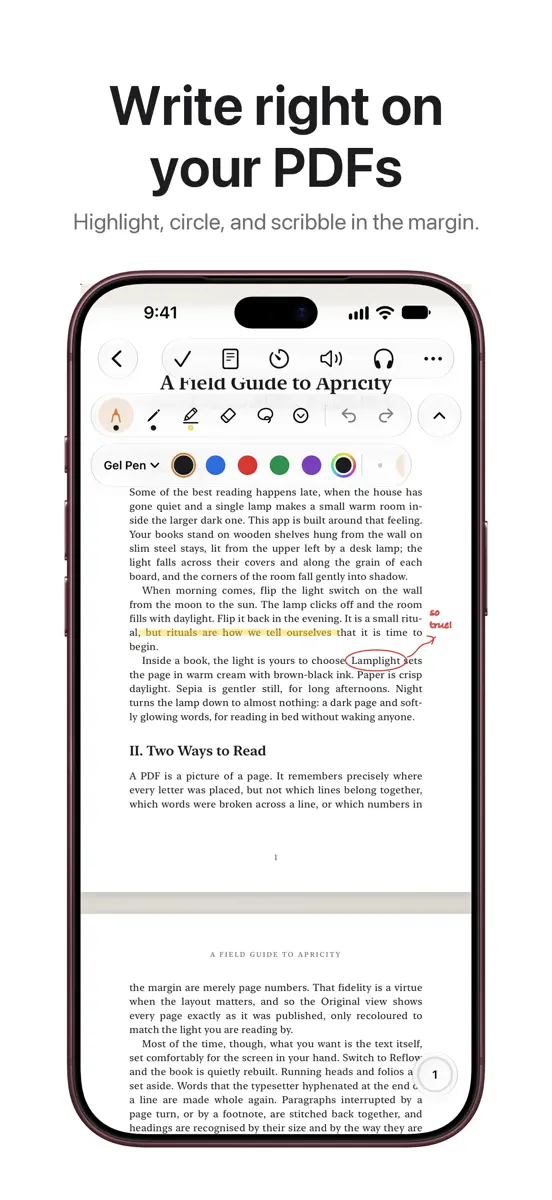
- Your pens finish each stroke the way ink does on paper: a little heavier where you press, and running out to a point as the pen lifts.
- Every pen has a panel of its own: how its ends taper, how it answers pressure, its thickness and darkness, with a sample stroke.
- Highlighters can lay down dots or dashes, and rule themselves straight.
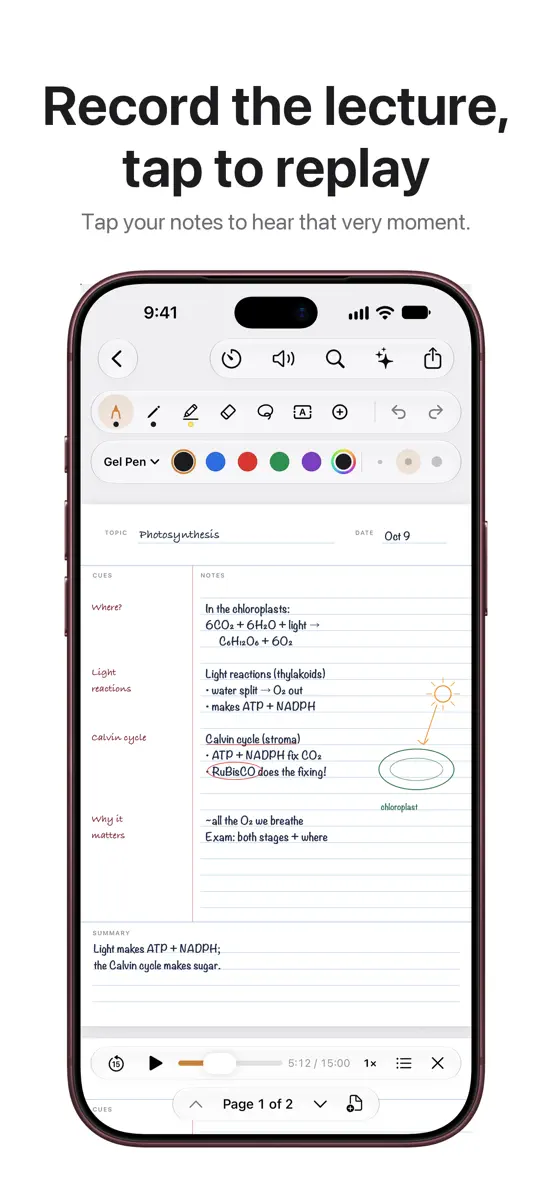
- Lined, dotted and squared paper can have lines in a colour and spacing of your choosing.
- The paper itself, and its lines, can be any colour you like.
- New notebooks start on pages the shape of your screen, so the page fills it edge to edge.
- Apple's own pen palette, if you prefer it: switch it on under More.
- Scroll or turn past the last page and a fresh one is waiting.
IMPROVED
- The tools stand down a rail at the side of the page, and the page runs the whole height of the screen. One tap folds the rail away.
- Lines on the paper stay crisp however far out you zoom.
- Starting a notebook is simpler: cover and first page side by side, and the paper's colour, lines and spacing to hand.
- Kokoro's British voices speak with British pronunciation.
- Play, Back and Forward answer at once: Kokoro keeps what it has just read, and begins a long sentence while the rest is made.
- Kokoro is ready as a book opens, so the first tap on Listen isn't a wait.
- Trying a voice pauses the book, which goes on when the sample ends.
- Under their names: Heart is Kokoro's best, Nicole whispers, and the three Santas are who you'd think.
- Come back from a pause and the voice starts its sentence again; after a long break, the one before it too.
- When the sleep timer runs out, the voice finishes its sentence before it stops.
- Kokoro's voices fade out gently as you pause, and back in as you play.
- Kokoro's voices keep downloading while you use another app, and a download that stops carries on from where it got to.
- On iPhone, typing past the foot of a page carries on at the top of the next.
- A pen set lighter stays that shade where strokes cross, or where you go over a letter.
- Neat Writing and tapered ends settle a word at a time as you pause, never under the pen.
- Ink follows the paper under your pen, so it shows on a dark page beside a light one.
- The pen panel's sample stroke is as thick as the line it draws on the page.
FIXED
- On iPhone, the keyboard stays up when you start typing in a text box.
- Light ink no longer turns dark a moment after you lift the pen.
- A line snapped straight no longer leaves the line you drew beside it.
- A stroke you undo no longer comes back when you write again.
- A stroke written just as a page is added or synced is no longer lost.
- The preview of a shape you hold to snap shows in your own ink, not black.
- Arrows no longer have a darker tip in a light pen or a highlighter.
- In the zoom window, the box moves on as soon as you write into the margin.
- If a Kokoro voice can't start, an Apple voice reads on rather than leaving you in silence.
Thanks for reading with Apricity.
Ranks come from Apple's public App Store charts, checked once a day. Appulse Index isn't affiliated with Apple.