

As of 10 Nov 2026, Limits: AI Usage Tracker is #11 in Grossing · Developer Tools in Brazil, its best of 5 chart positions across 5 countries. Over the last 7 days its biggest climb was 19 places, to #72 in Grossing · Developer Tools in the United States. Its best rank in the last 7 days was #10 in Grossing · Developer Tools in Japan. Appulse Index first saw Limits: AI Usage Tracker in a tracked chart on 8 Oct 2026. Since then it has charted on 34 days in 11 countries, with a best rank of #6 in Grossing · Developer Tools in Japan on 2 Nov 2026.
Current rank
#11Brazil · Grossing · Developer Tools
- Was
- #227 days ago
- Change
- Up 11 placesover 7 days
- Best
- #11in 7 days
- Longest chart run
- 34 daysBrazil · Grossing · Developer Tools
- New ratings, 7 days
- +4United States · since 3 Nov 2026
Chart record
Every tracked chart, country and day since Appulse Index first saw this app in a chart.
What's new
Version 1.0.9 · 11 days ago
Grok Bot now has its own place in Limits. Its weekly allowance comes with your Cursor plan or a linked SuperGrok, and it gets its own account on the dashboard, in widgets, account order and notifications. Add it like any other account. Each account now shows a 7-day usage history, with resets marked. Ask Siri how much of your limits you have left and when they reset. Limits flags data that hasn't refreshed in a while, so old numbers never look current. You can be reminded before a monthly plan renews, and widgets showing a single account can hide its header. Sign-ins survive Keychain hiccups, signing in again and removing accounts work reliably, Claude's 5-hour session no longer goes missing, Antigravity reads used-up and disabled limits correctly, and Cursor sign-in keeps waiting while you switch apps.
Ranking events
- Climbed #54 → #11 in Grossing · Developer ToolsBrazil
- Entered the Free · Developer Tools chart at #92India
- Entered the Free · Developer Tools chart at #89Canada
- Dropped #47 → #96 in Grossing · Developer ToolsSpain
- Entered the Grossing · Developer Tools chart at #19France
- Dropped #29 → #55 in Grossing · Developer ToolsGermany
Show 24 earlier events
- Climbed #70 → #29 in Grossing · Developer ToolsGermany
- Entered the Grossing · Developer Tools chart at #15Canada
- Climbed #90 → #14 in Grossing · Developer ToolsIndia
- Climbed #56 → #24 in Grossing · Developer ToolsUnited Kingdom
- Dropped #52 → #91 in Grossing · Developer ToolsUnited States
- Entered the Grossing · Developer Tools chart at #12Spain
- Climbed #61 → #6 in Grossing · Developer ToolsJapan
- Entered the Free · Developer Tools chart at #80Japan
- Entered the Free · Developer Tools chart at #94Australia
- Dropped #30 → #56 in Grossing · Developer ToolsUnited Kingdom
- Entered the Grossing · Developer Tools chart at #52United States
- Climbed #48 → #14 in Grossing · Developer ToolsBrazil
- Entered the Grossing · Developer Tools chart at #14Germany
- Entered the Free · Developer Tools chart at #93Germany
- Dropped #46 → #77 in Grossing · Developer ToolsUnited States
- Climbed #67 → #40 in Grossing · Developer ToolsJapan
- Entered the Free · Developer Tools chart at #88Canada
- Entered the Grossing · Developer Tools chart at #46United States
- New version 1.0.9 (was 1.0.8)
- Entered the Free · Developer Tools chart at #97Mexico
- Climbed #50 → #8 in Grossing · Developer ToolsMexico
- Climbed #51 → #10 in Grossing · Developer ToolsBrazil
- Dropped #56 → #86 in Grossing · Developer ToolsIndia
- Climbed #58 → #9 in Grossing · Developer ToolsUnited Kingdom
About
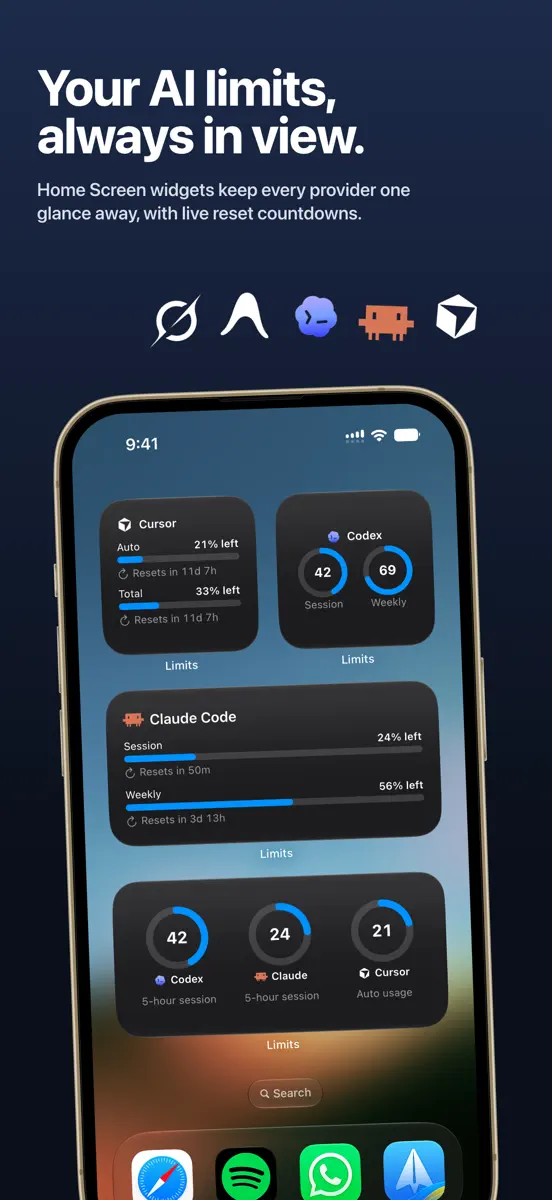
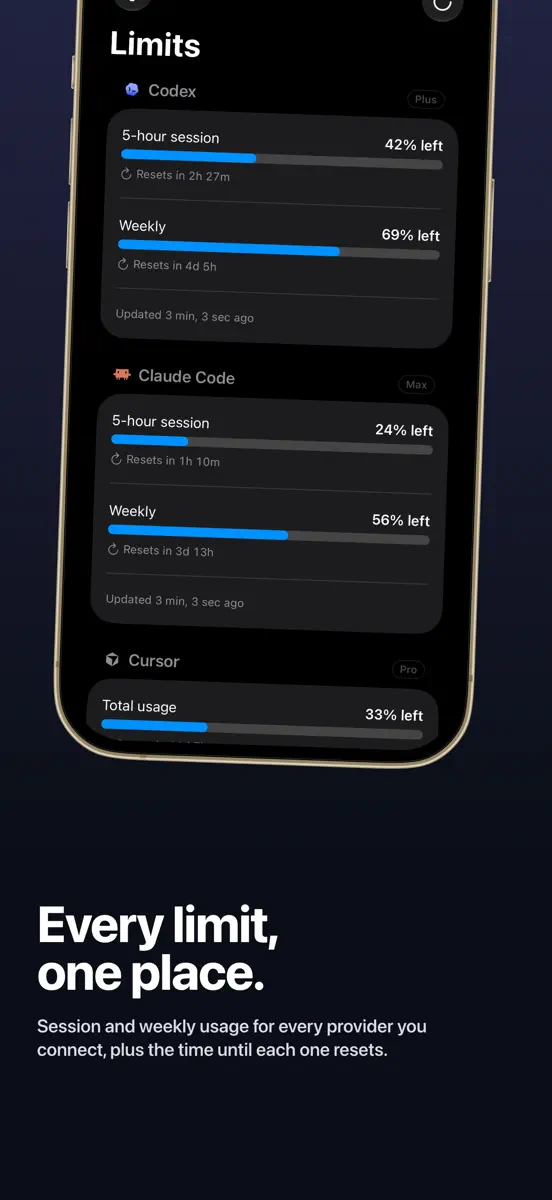
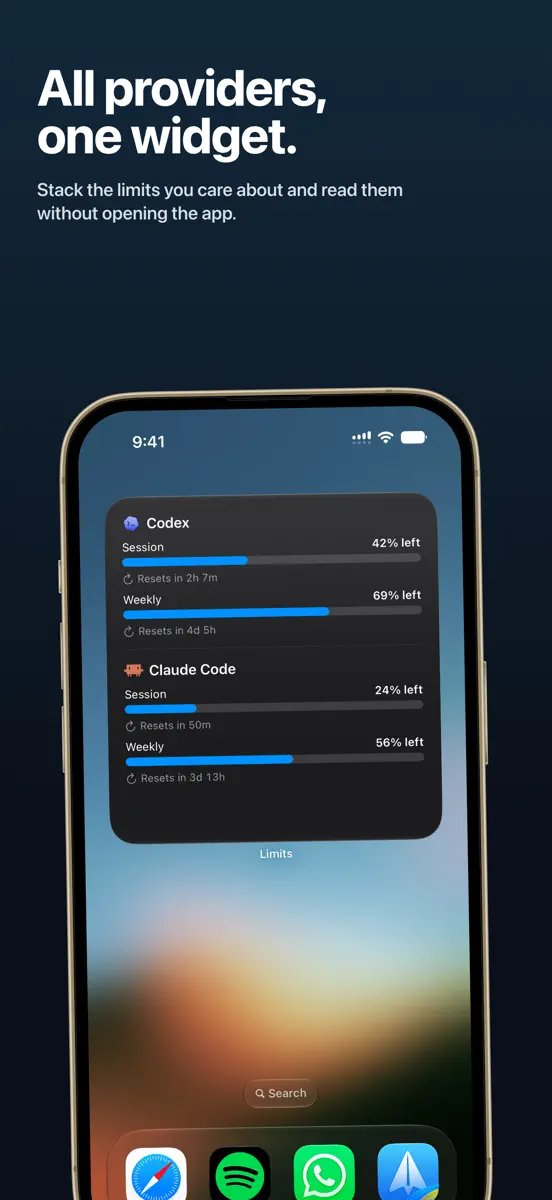
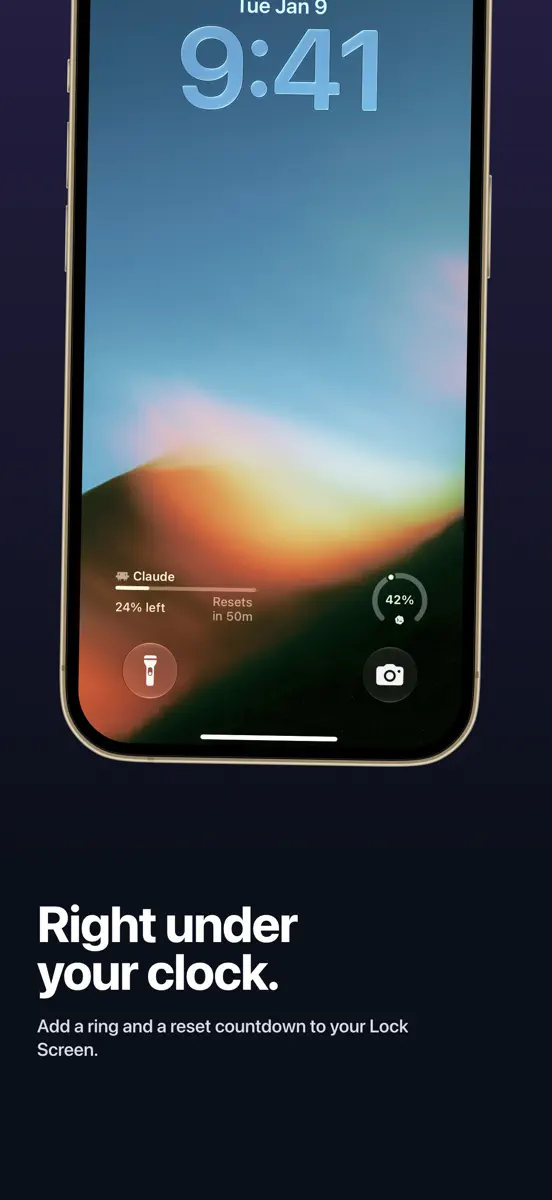
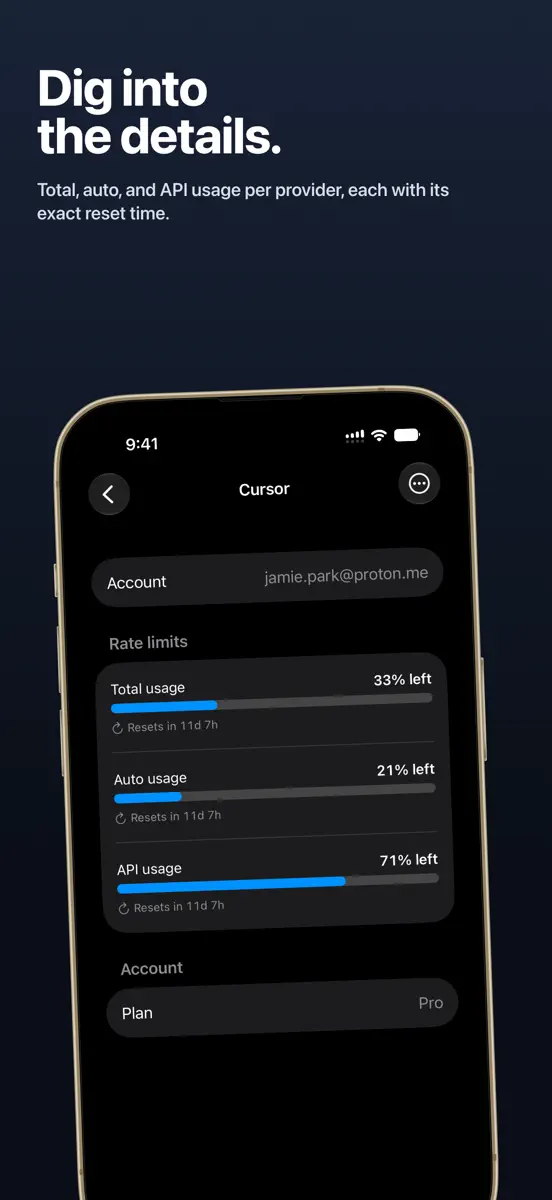
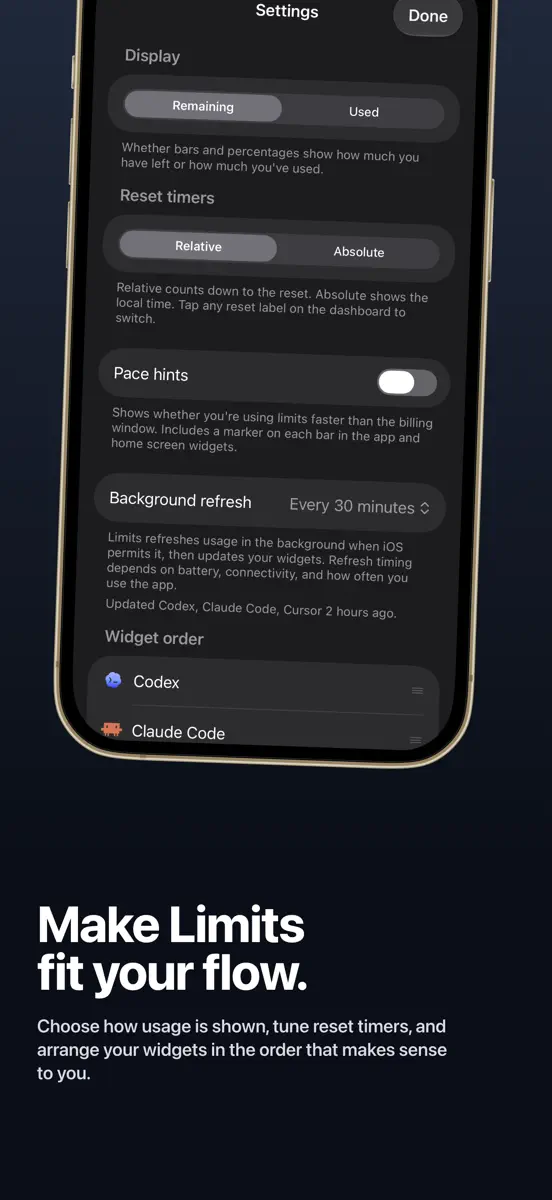
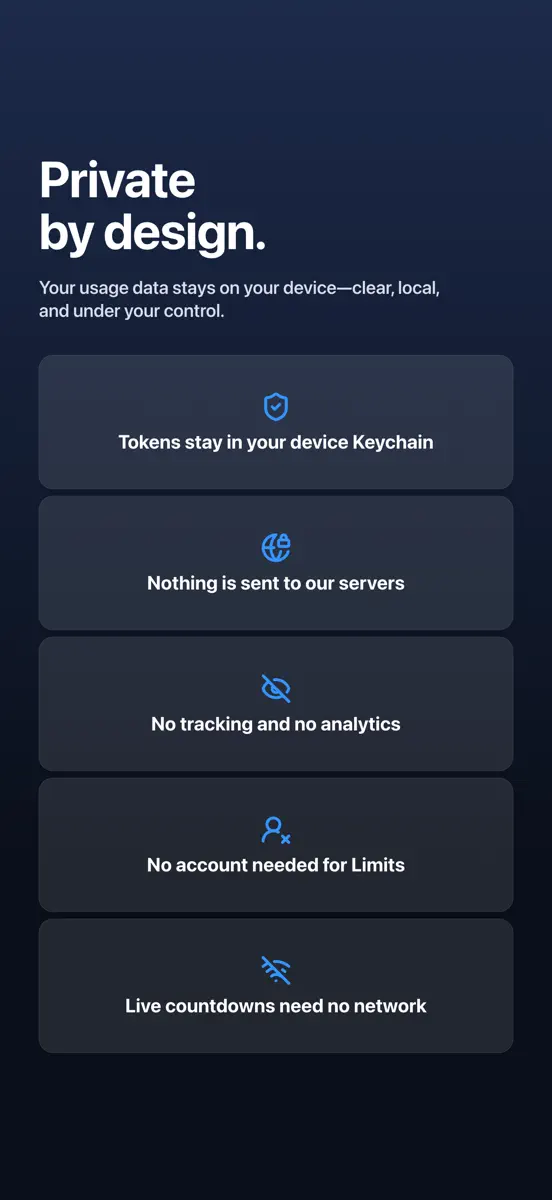
Limits shows your AI coding rate limits at a glance. See session usage, weekly quotas, and reset timers for the providers you connect, all in one place. Connect with secure sign in. Limits never sends your tokens to a server. Your tokens stay on your device in the Keychain, and your usage is cached on device so the widgets can read it. Home Screen and Lock Screen widgets keep your limits visible without opening the app. Live countdowns keep ticking between refreshes, so you always know how…
Ranks come from Apple's public App Store charts, checked once a day. Appulse Index isn't affiliated with Apple.
Rank history
Higher on the chart is better: #1 is at the top.
Sign in to see 30 days, 90 days and all history.
Brazil · Grossing · Developer Tools: best #11, latest #11, over 7 snapshots since 4 Nov.
In 5 charts now
| Chart | Rank | 24 h | 7 days | Best | Days on chart |
|---|---|---|---|---|---|
| Brazil· Grossing · Developer Tools · best #8 · 34 days · 7 days Up 11 places | #11 | Up 43 places | Up 11 places | #8 | 34 |
| India· Grossing · Developer Tools · best #9 · 34 days · 7 days Down 24 places | #38 | Down 5 places | Down 24 places | #9 | 34 |
| Mexico· Grossing · Developer Tools · best #8 · 24 days · 7 days Down 21 places | #49 | Down 5 places | Down 21 places | #8 | 24 |
| Japan· Grossing · Developer Tools · best #6 · 31 days · 7 days Down 52 places | #69 | Down 13 places | Down 52 places | #6 | 31 |
| United States· Grossing · Developer Tools · best #33 · 28 days · 7 days Up 19 places | #72 | Up 21 places | Up 19 places | #33 | 28 |
Competitors
Compare with the top 3Full chartTop of Grossing · Developer Tools in Brazil. Limits: AI Usage Tracker is #11 there. Changes are over 7 days.
- #1 (number one)No change
 GitHubGitHub
- #2No change
- #3No change
 CursorX Corp.
- #4Up 1 place
 Termius - Modern SSH ClientTermius Corporation
- #5Up 36 places
 Find My Device₊Georgy Natsvlishvili
- #6Up 27 places
 v0Vercel, Inc
- #7No change
 SpeedTest- Wifi Analyzer 5G 4GHYPE YAZILIM
- #8New entry
 Foredeck — Kubernetes ConsoleAndrei Kozlovskii
- #9Up 25 places
 Device Monitor²Fast-Devs Project
- #10No change
 ResolutionerSun Apps, LLC
- #12Not enough history yet
 Macky: Macリモート&ターミナルVelosify Private Limited
- #13Up 2 places
 Vibe Code: AI Code GeneratorMalik Hamza Khalid
- #14New entry
 Infinity WorkflowsWonderlink SL
- #15Up 2 places
 GDevelop - Create & Play GamesGDEVELOP FRANCE
- #16No change
 Moshi: herdr/tmux on SSH/MOSHMoshi Tech Ltd.
- #17Down 9 places
 Claude Code Notifier CompanionTouchTap
- #18Up 29 places
 HTML EditorIntrepid
- #19Down 8 places
 Proxyman - Capture HTTPSProxyman LLC
- #20Up 16 places
 WebhookBeam: Alertas WebhookElsayed Hussein
- #21Up 16 places
 STL File Viewer ProAndeesh Mehdi Syed

Screenshots

As of 10 Nov 2026, Limits: AI Usage Tracker is #11 in Grossing · Developer Tools in Brazil, its best of 5 chart positions across 5 countries. Over the last 7 days its biggest climb was 19 places, to #72 in Grossing · Developer Tools in the United States. Its best rank in the last 7 days was #10 in Grossing · Developer Tools in Japan. Appulse Index first saw Limits: AI Usage Tracker in a tracked chart on 8 Oct 2026. Since then it has charted on 34 days in 11 countries, with a best rank of #6 in Grossing · Developer Tools in Japan on 2 Nov 2026.
Store listing
How the app presents itself on the App Store. Select a screenshot to open it full size.
App facts
What Apple publishes about this app. Ratings are from one country's App Store.
- Price
- Free
- Rating
- 4.3 / 5 stars47 ratings United States
- Released
- 14 Jul 2026
- Last update
- Version 1.0.9
- Requires
- iOS 26.0or later
- Size
- 20.4 MB
- Languages
- 11
Chart record
Every tracked chart, country and day since Appulse Index first saw this app in a chart.
Rank history
Higher on the chart is better: #1 is at the top.
Sign in to see 30 days, 90 days and all history.
Brazil · Grossing · Developer Tools: best #11, latest #11, over 7 snapshots since 4 Nov.
Current rankings
Every chart this app is in right now, best position first.
| Chart | Rank | 24 h | 7 days | Best | Days on chart |
|---|---|---|---|---|---|
| Brazil· Grossing · Developer Tools · best #8 · 34 days · 7 days Up 11 places | #11 | Up 43 places | Up 11 places | #8 | 34 |
| India· Grossing · Developer Tools · best #9 · 34 days · 7 days Down 24 places | #38 | Down 5 places | Down 24 places | #9 | 34 |
| Mexico· Grossing · Developer Tools · best #8 · 24 days · 7 days Down 21 places | #49 | Down 5 places | Down 21 places | #8 | 24 |
| Japan· Grossing · Developer Tools · best #6 · 31 days · 7 days Down 52 places | #69 | Down 13 places | Down 52 places | #6 | 31 |
| United States· Grossing · Developer Tools · best #33 · 28 days · 7 days Up 19 places | #72 | Up 21 places | Up 19 places | #33 | 28 |
Ranking events
Entries, big moves, #1s and new versions we've recorded, by day.
- Climbed #54 → #11 in Grossing · Developer ToolsBrazil
- Entered the Free · Developer Tools chart at #92India
- Entered the Free · Developer Tools chart at #89Canada
- Dropped #47 → #96 in Grossing · Developer ToolsSpain
- Entered the Grossing · Developer Tools chart at #19France
- Dropped #29 → #55 in Grossing · Developer ToolsGermany
- Climbed #70 → #29 in Grossing · Developer ToolsGermany
- Entered the Grossing · Developer Tools chart at #15Canada
- Climbed #90 → #14 in Grossing · Developer ToolsIndia
- Climbed #56 → #24 in Grossing · Developer ToolsUnited Kingdom
- Dropped #52 → #91 in Grossing · Developer ToolsUnited States
- Entered the Grossing · Developer Tools chart at #12Spain
- Climbed #61 → #6 in Grossing · Developer ToolsJapan
- Entered the Free · Developer Tools chart at #80Japan
- Entered the Free · Developer Tools chart at #94Australia
- Dropped #30 → #56 in Grossing · Developer ToolsUnited Kingdom
- Entered the Grossing · Developer Tools chart at #52United States
- Climbed #48 → #14 in Grossing · Developer ToolsBrazil
- Entered the Grossing · Developer Tools chart at #14Germany
- Entered the Free · Developer Tools chart at #93Germany
- Dropped #46 → #77 in Grossing · Developer ToolsUnited States
- Climbed #67 → #40 in Grossing · Developer ToolsJapan
- Entered the Free · Developer Tools chart at #88Canada
- Entered the Grossing · Developer Tools chart at #46United States
- New version 1.0.9 (was 1.0.8)
- Entered the Free · Developer Tools chart at #97Mexico
- Climbed #50 → #8 in Grossing · Developer ToolsMexico
- Climbed #51 → #10 in Grossing · Developer ToolsBrazil
- Dropped #56 → #86 in Grossing · Developer ToolsIndia
- Climbed #58 → #9 in Grossing · Developer ToolsUnited Kingdom
Competitors
Compare with the top 3Full chartTop of Grossing · Developer Tools in Brazil. Limits: AI Usage Tracker is #11 there. Changes are over 7 days.
- #1 (number one)No changeGitHubGitHub
- #2No change
- #3No changeCursorX Corp.
- #4Up 1 placeTermius - Modern SSH ClientTermius Corporation
- #5Up 36 placesFind My Device₊Georgy Natsvlishvili
- #6Up 27 placesv0Vercel, Inc
- #7No changeSpeedTest- Wifi Analyzer 5G 4GHYPE YAZILIM
- #8New entryForedeck — Kubernetes ConsoleAndrei Kozlovskii
- #9Up 25 placesDevice Monitor²Fast-Devs Project
- #10No changeResolutionerSun Apps, LLC
- #11Up 11 places
 Limits: AI Usage TrackerThis app
- #12Not enough history yetMacky: Macリモート&ターミナルVelosify Private Limited
- #13Up 2 placesVibe Code: AI Code GeneratorMalik Hamza Khalid
- #14New entryInfinity WorkflowsWonderlink SL
- #15Up 2 placesGDevelop - Create & Play GamesGDEVELOP FRANCE
- #16No changeMoshi: herdr/tmux on SSH/MOSHMoshi Tech Ltd.
- #17Down 9 placesClaude Code Notifier CompanionTouchTap
- #18Up 29 placesHTML EditorIntrepid
- #19Down 8 placesProxyman - Capture HTTPSProxyman LLC
- #20Up 16 placesWebhookBeam: Alertas WebhookElsayed Hussein
- #21Up 16 placesSTL File Viewer ProAndeesh Mehdi Syed
About
From the app's App Store listing.
Limits shows your AI coding rate limits at a glance. See session usage, weekly quotas, and reset timers for the providers you connect, all in one place.
Connect with secure sign in. Limits never sends your tokens to a server. Your tokens stay on your device in the Keychain, and your usage is cached on device so the widgets can read it.
Home Screen and Lock Screen widgets keep your limits visible without opening the app. Live countdowns keep ticking between refreshes, so you always know how…
What's new
Version 1.0.9 · 30 Oct 2026 ·
Grok Bot now has its own place in Limits. Its weekly allowance comes with your Cursor plan or a linked SuperGrok, and it gets its own account on the dashboard, in widgets, account order and notifications. Add it like any other account.
Each account now shows a 7-day usage history, with resets marked.
Ask Siri how much of your limits you have left and when they reset.
Limits flags data that hasn't refreshed in a while, so old numbers never look current. You can be reminded before a monthly plan renews, and widgets showing a single account can hide its header.
Sign-ins survive Keychain hiccups, signing in again and removing accounts work reliably, Claude's 5-hour session no longer goes missing, Antigravity reads used-up and disabled limits correctly, and Cursor sign-in keeps waiting while you switch apps.
Ranks come from Apple's public App Store charts, checked once a day. Appulse Index isn't affiliated with Apple.