

As of 5 Nov 2026, Duo Keyboard: Resize & Split is #87 in Paid · Utilities in Canada, the one tracked chart it's in. Its best rank in the last 7 days was #45 in Paid · Utilities in Canada.
Current rank
#87Canada · Paid · Utilities
- Was
- —7 days ago
- Change
- Not enough history yetover 7 days
- Best
- #45in 7 days
- Longest chart run
- 2 daysCanada · Paid · Utilities
- New ratings, 7 days
- —Needs a week of rating history
What's new
Version 1.1.0 · 4 days ago
Duo Keyboard now supports 30 input languages, with language and layout settings together in one place. • New options include German, Russian, Arabic, Hindi and more. • Use Chinese Pinyin with Simplified and Traditional conversion, Japanese romaji with kana and kanji conversion, and Vietnamese Telex. • Choose any two distinct inputs from 32 language and emoji options as Primary and Secondary. • Select a language and layout together in the Typing tab. The duplicate input chooser has been removed from Size & Layout. • Set each input’s layout independently, including six Korean layouts and English QWERTY or 12-key. Changing one input keeps the other input’s layout intact. • The new language input runs on device and does not require Full Access.
Ranking events
- Dropped #45 → #87 in Paid · UtilitiesCanada
- Entered the Paid · Utilities chart at #45Canada
About
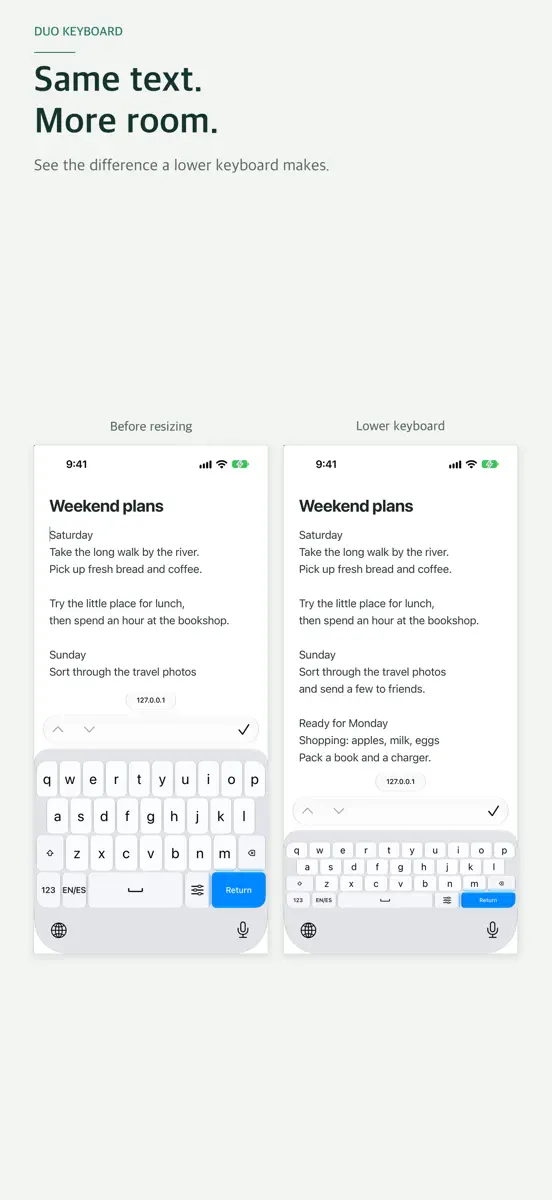
Lower your keyboard to see more of your text, and bring the keys closer to either thumb. Duo Keyboard lets you choose the size and position that suit your hands. Split the keys on a wide screen and switch between two inputs chosen from 30 languages and emoji. Buy once, with no subscription or in-app purchases. MORE ROOM FOR YOUR TEXT Adjust keyboard height and width while watching the keys change. Settings open above the live keyboard. Make a one-handed layout smaller or expand it to the…
Ranks come from Apple's public App Store charts, checked once a day. Appulse Index isn't affiliated with Apple.
Rank history
Higher on the chart is better: #1 is at the top.
Sign in to see 30 days, 90 days and all history.
Canada · Paid · Utilities: best #45, latest #87, over 7 snapshots since 30 Oct.
In 1 chart now
| Chart | Rank | 24 h | 7 days | Best | Days on chart |
|---|---|---|---|---|---|
| Canada· Paid · Utilities · best #45 · 2 days | #87 | Down 42 places | Not enough history yet | #45 | 2 |
Competitors
Compare with the top 3Full chartTop of Paid · Utilities in Canada. Duo Keyboard: Resize & Split is #87 there. Changes are over 7 days.
- #1 (number one)No change
 ShadowrocketShadow Launch Technology Limited
- #2No change
 LandTracker Pro LSD FinderRocanda Technologies Inc
- #3Up 2 places
 Noir - Dark Mode for SafariJeffrey Kuiken
- #4Not enough history yet
 Fold by FoldGregory Mckeithan
- #5Up 4 places
 FORScan Lite - for Ford, MazdaAleksei Savin
- #6Up 8 places
 Just Press RecordOpen Planet Software
- #7Up 12 places
 Piping DataBase - XTREMERadin Alcira
- #8Not enough history yet
 Duo Fold CounterJulian Christopher Siebert
- #9Up 27 places
 Frame Crop – Art ModeShane Jeffers
- #10No change
 Wipr 2Kaylee Calderolla
- #11Not enough history yet
 AdGuard Pro: Safari Ad BlockerAdguard Software Limited
- #12Down 9 places
 atvToolsOleksandr Hamlii
- #13Up 48 places
 Convertisseur AcéricoleCentre ACER
- #14Up 16 places
 Mapper for SafariAlex Kitcoff
- #15New entry
 Amplosion: Redirect AMP LinksChristian Selig
- #16Not enough history yet
 Night Vision LIDAR CameraThomas Backes
- #17Up 14 places
 Necrophonicchris rogers
- #18Not enough history yet
 Stash - Rule Based ProxySTASH NETWORKS LIMITED
- #19Not enough history yet
 RF AwareAllykiro Valdez
- #20Not enough history yet
 Private LLM - Local AI ChatNumen Technologies Limited
Screenshots


As of 5 Nov 2026, Duo Keyboard: Resize & Split is #87 in Paid · Utilities in Canada, the one tracked chart it's in. Its best rank in the last 7 days was #45 in Paid · Utilities in Canada.
Store listing
How the app presents itself on the App Store. Select a screenshot to open it full size.
App facts
What Apple publishes about this app. Ratings are from one country's App Store.
- Price
- CA$3.99
- Released
- 28 Oct 2026
- Last update
- Version 1.1.0
- Requires
- iOS 17.0or later
- Size
- 152.4 MB
- Languages
- 2
Rank history
Higher on the chart is better: #1 is at the top.
Sign in to see 30 days, 90 days and all history.
Canada · Paid · Utilities: best #45, latest #87, over 7 snapshots since 30 Oct.
Current rankings
Every chart this app is in right now, best position first.
| Chart | Rank | 24 h | 7 days | Best | Days on chart |
|---|---|---|---|---|---|
| Canada· Paid · Utilities · best #45 · 2 days | #87 | Down 42 places | Not enough history yet | #45 | 2 |
Ranking events
Entries, big moves, #1s and new versions we've recorded, by day.
- Dropped #45 → #87 in Paid · UtilitiesCanada
- Entered the Paid · Utilities chart at #45Canada
Competitors
Compare with the top 3Full chartTop of Paid · Utilities in Canada. Duo Keyboard: Resize & Split is #87 there. Changes are over 7 days.
- #1 (number one)No changeShadowrocketShadow Launch Technology Limited
- #2No changeLandTracker Pro LSD FinderRocanda Technologies Inc
- #3Up 2 placesNoir - Dark Mode for SafariJeffrey Kuiken
- #4Not enough history yetFold by FoldGregory Mckeithan
- #5Up 4 placesFORScan Lite - for Ford, MazdaAleksei Savin
- #6Up 8 placesJust Press RecordOpen Planet Software
- #7Up 12 placesPiping DataBase - XTREMERadin Alcira
- #8Not enough history yetDuo Fold CounterJulian Christopher Siebert
- #9Up 27 placesFrame Crop – Art ModeShane Jeffers
- #10No changeWipr 2Kaylee Calderolla
- #11Not enough history yetAdGuard Pro: Safari Ad BlockerAdguard Software Limited
- #12Down 9 placesatvToolsOleksandr Hamlii
- #13Up 48 placesConvertisseur AcéricoleCentre ACER
- #14Up 16 placesMapper for SafariAlex Kitcoff
- #15New entryAmplosion: Redirect AMP LinksChristian Selig
- #16Not enough history yetNight Vision LIDAR CameraThomas Backes
- #17Up 14 placesNecrophonicchris rogers
- #18Not enough history yetStash - Rule Based ProxySTASH NETWORKS LIMITED
- #19Not enough history yetRF AwareAllykiro Valdez
- #20Not enough history yetPrivate LLM - Local AI ChatNumen Technologies Limited
- #87Not enough history yetDuo Keyboard: Resize & SplitThis app
About
From the app's App Store listing.
Lower your keyboard to see more of your text, and bring the keys closer to either thumb. Duo Keyboard lets you choose the size and position that suit your hands. Split the keys on a wide screen and switch between two inputs chosen from 30 languages and emoji. Buy once, with no subscription or in-app purchases.
MORE ROOM FOR YOUR TEXT Adjust keyboard height and width while watching the keys change. Settings open above the live keyboard. Make a one-handed layout smaller or expand it to the…
What's new
Version 1.1.0 · 1 Nov 2026 ·
Duo Keyboard now supports 30 input languages, with language and layout settings together in one place.
- New options include German, Russian, Arabic, Hindi and more.
- Use Chinese Pinyin with Simplified and Traditional conversion, Japanese romaji with kana and kanji conversion, and Vietnamese Telex.
- Choose any two distinct inputs from 32 language and emoji options as Primary and Secondary.
- Select a language and layout together in the Typing tab. The duplicate input chooser has been removed from Size & Layout.
- Set each input’s layout independently, including six Korean layouts and English QWERTY or 12-key. Changing one input keeps the other input’s layout intact.
- The new language input runs on device and does not require Full Access.
Ranks come from Apple's public App Store charts, checked once a day. Appulse Index isn't affiliated with Apple.