

As of 10 Nov 2026, Grocery/ShoppingList is #13 in Paid · Shopping in the United States, the one tracked chart it's in. Appulse Index first saw Grocery/ShoppingList in a tracked chart on 10 Nov 2026. Since then it has charted on 1 day in 1 country, with a best rank of #13 in Paid · Shopping in the United States on 10 Nov 2026.
Current rank
#13United States · Paid · Shopping
- Was
- —7 days ago
- Change
- Not enough history yetover 7 days
- Best
- #13in 7 days
- Longest chart run
- 1 dayUnited States · Paid · Shopping
- New ratings, 7 days
- —Needs a week of rating history
Chart record
Every tracked chart, country and day since Appulse Index first saw this app in a chart.
What's new
Version 1.2.6 · 19 days ago
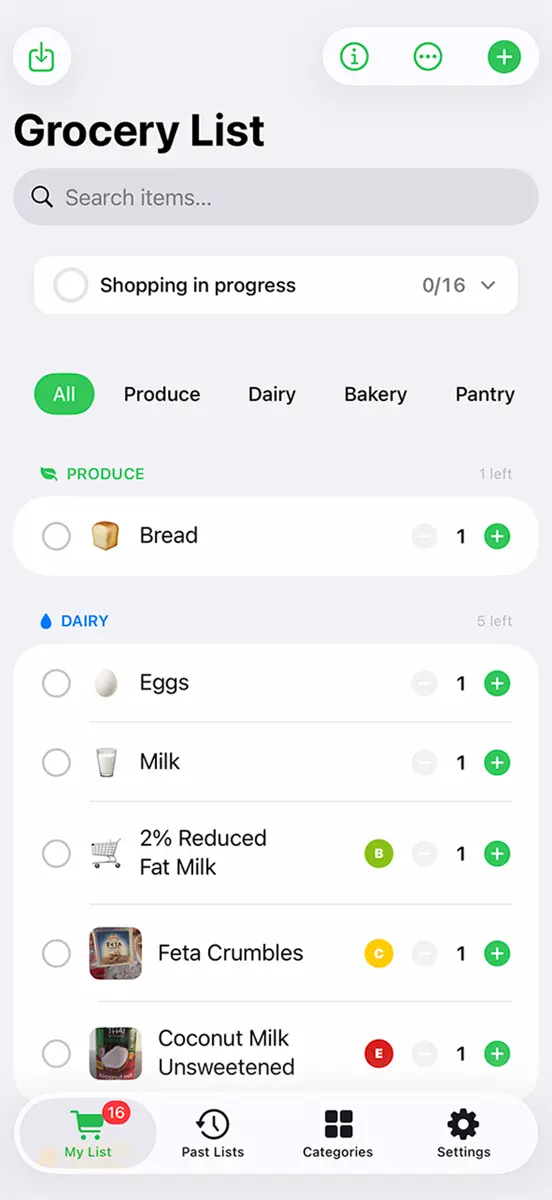
Turn your recipes into a grocery list you can shop from. Photograph a printed recipe or choose a recipe image, review the ingredients, and add them to MyGroceryList. Import more recipes one at a time to build a combined list with cumulative ingredient totals. START WITH SIRI Say "Hey Siri, scan a recipe in MyGroceryList" to open the recipe scanner. Choose Take Photo or Choose Photo when you're ready. The camera opens only when you select it. You can also start from the app or Apple's Shortcuts app. KNOW WHICH RECIPE NEEDS WHAT Give each recipe a name by typing or tapping the microphone and speaking. Shared ingredients stay together in one grocery row. Tap an ingredient to see how much each recipe needs. Select an existing recipe when scanning another page to keep its ingredients under the same label. MAKE MORE WITH A RECIPE MULTIPLIER Double, triple, or choose another recipe amount before importing. The ingredient preview and grocery totals adjust automatically. Change a named recipe later from Recipe Amounts in the list menu. Its ingredients update together, while other recipes keep their own amounts. Labels such as "Cake (3x recipe)" help you remember the planned quantity. ONE INGREDIENT, ONE TOTAL Matching recipe ingredients share a single row. Common equivalents, such as flour and all-purpose flour, are combined. Fractions are preserved, and compatible measurements are added together. Different varieties, such as almond flour and regular flour, stay separate. Weight and volume remain visible as separate amounts when they cannot be combined. READ WRAPPED LINES AND RECIPE COLUMNS Recognize ingredients spread across multiple columns or wrapped onto several lines, including complete names such as shredded Monterey Jack cheese. Review and correct recognized text before adding. COUNTS AND PACKAGE SIZES THAT MAKE SENSE See the actual number of eggs or cans you need. A recipe calling for two 15-ounce cans keeps both the two-can count and the size of each can. Measured ingredients show totals such as 5 1/2 cups directly in the list. Scaling changes package counts while keeping each package's size. ORGANIZE AS YOU ADD Recipe ingredients use matching existing categories and previous ingredient assignments. Supported custom categories, such as Baking, Vegetables, Spices, and Seafood, are used when available. Unmatched ingredients go to Other. Review category assignments before adding. KEEP EVERYDAY SHOPPING SIMPLE - Add groceries by typing, voice, or quick suggestions. - Scan product barcodes to look up available nutrition information from Open Food Facts. - Create and arrange your own categories. - Check off groceries, search your list, and filter by category. - Save lists to history and reuse them later. - Print your grocery list or send it by email. - Sync lists through iCloud across devices signed in to the same Apple ID. Recipe photo text recognition happens on your device. For best results, photograph the ingredients section of a printed English recipe and review the text before adding. Voice entry requires microphone and speech recognition permission. Unspecified amounts such as "to taste" stay unchanged when scaling. Earlier scans without recipe labels appear as recipe unknown and cannot be scaled as a named recipe. Available for iPhone and iPad running iOS 17 or later.
Ranking events
- Entered the Paid · Shopping chart at #13United States
About
Turn your recipes into a grocery list you can shop from. Photograph a printed recipe or choose a recipe image, review the ingredients, and add them to MyGroceryList. Import more recipes one at a time to build a combined list with cumulative ingredient totals. START WITH SIRI Say "Hey Siri, scan a recipe in MyGroceryList" to open the recipe scanner. Take a photo, check the recognized text, and add the ingredients to your list. You can also start from the app or Apple's Shortcuts app. ONE…
Ranks come from Apple's public App Store charts, checked once a day. Appulse Index isn't affiliated with Apple.
Rank history
Higher on the chart is better: #1 is at the top.
Sign in to see 30 days, 90 days and all history.
United States · Paid · Shopping: best #13, latest #13, over 7 snapshots since 4 Nov.
In 1 chart now
| Chart | Rank | 24 h | 7 days | Best | Days on chart |
|---|---|---|---|---|---|
| United States· Paid · Shopping · best #13 · 1 day | #13 | New entry | Not enough history yet | #13 | 1 |
Competitors
Compare with the top 3Full chartTop of Paid · Shopping in United States. Grocery/ShoppingList is #13 there. Changes are over 7 days.
- #1 (number one)No change
 FSD HunterDavid Hugenberg
- #2No change
 The Christmas ListErik Eggleston
- #3Up 68 places
 Sale Price + Tax CalculatorJacob Hazelgrove
- #4Up 7 places
- #5Down 2 places
- #6New entry
 Shop List TallyParan
- #7Down 3 places
 Penny FinderRingtones LLC
- #8No change
 Baby's Heartbeat BackupMy Baby's Heartbeat Bear
- #9Up 7 places
 Buycott - Barcode Scanner & QR Bar Code ScannerBuycott Inc.
- #10Up 28 places
 Green Code-Receive SMS onlineShenzhen Qisi Network Technology Co., Ltd.
- #11Up 78 places
 Just Cards: Loyalty WalletPeter Kresanic
- #12Up 21 places
 Image Resizer Pro - image cropkitaek kim
- #14New entry
 My Barcode CardsAntonios Zalonis
- #15Down 8 places
- #16Up 3 places
 Toyota, Lexus Car PartsRuslan Balkarov
- #17Up 19 places
 Pressed Coins 4 WDWHollis Ambrose
- #18Not enough history yet
 Bag Au PairDanny Burgans
- #19Up 65 places
 In The BasketKarl Cridland
- #20Up 41 places
 Catsup: Grocery ListAnd a Dinosaur
- #21Up 77 places
 CityMart.Localites Private Limited


Screenshots


More from Greg Anderson
| App | Best rank now | Released | App Store |
|---|---|---|---|
 ICMPhotoForgePhoto & Video · | Paid · Photo & VideoIndia#26 | ||
 BrightroomPhoto & Video · | Paid · Photo & VideoFrance#73 | ||
 Lab ChannelsPhoto & Video · | Not charting | ||
 PresetCollectionPhoto & Video · | Not charting | ||
 DoubleIt CameraPhoto & Video · | Not charting | ||
 Vanishing FramePhoto & Video · | Not charting | ||
 Infrared CameraPhoto & Video · | Not charting | ||
 SlangDecoderUtilities · | Not charting | ||
 Ancient LightPhoto & Video · | Not charting |

As of 10 Nov 2026, Grocery/ShoppingList is #13 in Paid · Shopping in the United States, the one tracked chart it's in. Appulse Index first saw Grocery/ShoppingList in a tracked chart on 10 Nov 2026. Since then it has charted on 1 day in 1 country, with a best rank of #13 in Paid · Shopping in the United States on 10 Nov 2026.
Store listing
How the app presents itself on the App Store. Select a screenshot to open it full size.
App facts
What Apple publishes about this app. Ratings are from one country's App Store.
- Price
- $0.99
- Released
- 14 Mar 2026
- Last update
- Version 1.2.6
- Requires
- iOS 17.0or later
- Size
- 2.5 MB
- Languages
- 1
Chart record
Every tracked chart, country and day since Appulse Index first saw this app in a chart.
Rank history
Higher on the chart is better: #1 is at the top.
Sign in to see 30 days, 90 days and all history.
United States · Paid · Shopping: best #13, latest #13, over 7 snapshots since 4 Nov.
Current rankings
Every chart this app is in right now, best position first.
| Chart | Rank | 24 h | 7 days | Best | Days on chart |
|---|---|---|---|---|---|
| United States· Paid · Shopping · best #13 · 1 day | #13 | New entry | Not enough history yet | #13 | 1 |
Ranking events
Entries, big moves, #1s and new versions we've recorded, by day.
- Entered the Paid · Shopping chart at #13United States
Competitors
Compare with the top 3Full chartTop of Paid · Shopping in United States. Grocery/ShoppingList is #13 there. Changes are over 7 days.
- #1 (number one)No changeFSD HunterDavid Hugenberg
- #2No changeThe Christmas ListErik Eggleston
- #3Up 68 placesSale Price + Tax CalculatorJacob Hazelgrove
- #4Up 7 places
- #5Down 2 places
- #6New entryShop List TallyParan
- #7Down 3 placesPenny FinderRingtones LLC
- #8No changeBaby's Heartbeat BackupMy Baby's Heartbeat Bear
- #9Up 7 placesBuycott - Barcode Scanner & QR Bar Code ScannerBuycott Inc.
- #10Up 28 placesGreen Code-Receive SMS onlineShenzhen Qisi Network Technology Co., Ltd.
- #11Up 78 placesJust Cards: Loyalty WalletPeter Kresanic
- #12Up 21 placesImage Resizer Pro - image cropkitaek kim
- #13New entry
 Grocery/ShoppingListThis app
- #14New entryMy Barcode CardsAntonios Zalonis
- #15Down 8 places
- #16Up 3 placesToyota, Lexus Car PartsRuslan Balkarov
- #17Up 19 placesPressed Coins 4 WDWHollis Ambrose
- #18Not enough history yetBag Au PairDanny Burgans
- #19Up 65 placesIn The BasketKarl Cridland
- #20Up 41 placesCatsup: Grocery ListAnd a Dinosaur
- #21Up 77 placesCityMart.Localites Private Limited
About
From the app's App Store listing.
Turn your recipes into a grocery list you can shop from.
Photograph a printed recipe or choose a recipe image, review the ingredients, and add them to MyGroceryList. Import more recipes one at a time to build a combined list with cumulative ingredient totals.
START WITH SIRI Say "Hey Siri, scan a recipe in MyGroceryList" to open the recipe scanner. Take a photo, check the recognized text, and add the ingredients to your list. You can also start from the app or Apple's Shortcuts app.
ONE…
What's new
Version 1.2.6 · 22 Oct 2026 ·
Turn your recipes into a grocery list you can shop from.
Photograph a printed recipe or choose a recipe image, review the ingredients, and add them to MyGroceryList. Import more recipes one at a time to build a combined list with cumulative ingredient totals.
START WITH SIRI Say "Hey Siri, scan a recipe in MyGroceryList" to open the recipe scanner. Choose Take Photo or Choose Photo when you're ready. The camera opens only when you select it. You can also start from the app or Apple's Shortcuts app.
KNOW WHICH RECIPE NEEDS WHAT Give each recipe a name by typing or tapping the microphone and speaking. Shared ingredients stay together in one grocery row. Tap an ingredient to see how much each recipe needs. Select an existing recipe when scanning another page to keep its ingredients under the same label.
MAKE MORE WITH A RECIPE MULTIPLIER Double, triple, or choose another recipe amount before importing. The ingredient preview and grocery totals adjust automatically. Change a named recipe later from Recipe Amounts in the list menu. Its ingredients update together, while other recipes keep their own amounts. Labels such as "Cake (3x recipe)" help you remember the planned quantity.
ONE INGREDIENT, ONE TOTAL Matching recipe ingredients share a single row. Common equivalents, such as flour and all-purpose flour, are combined. Fractions are preserved, and compatible measurements are added together. Different varieties, such as almond flour and regular flour, stay separate. Weight and volume remain visible as separate amounts when they cannot be combined.
READ WRAPPED LINES AND RECIPE COLUMNS Recognize ingredients spread across multiple columns or wrapped onto several lines, including complete names such as shredded Monterey Jack cheese. Review and correct recognized text before adding.
COUNTS AND PACKAGE SIZES THAT MAKE SENSE See the actual number of eggs or cans you need. A recipe calling for two 15-ounce cans keeps both the two-can count and the size of each can. Measured ingredients show totals such as 5 1/2 cups directly in the list. Scaling changes package counts while keeping each package's size.
ORGANIZE AS YOU ADD Recipe ingredients use matching existing categories and previous ingredient assignments. Supported custom categories, such as Baking, Vegetables, Spices, and Seafood, are used when available. Unmatched ingredients go to Other. Review category assignments before adding.
KEEP EVERYDAY SHOPPING SIMPLE
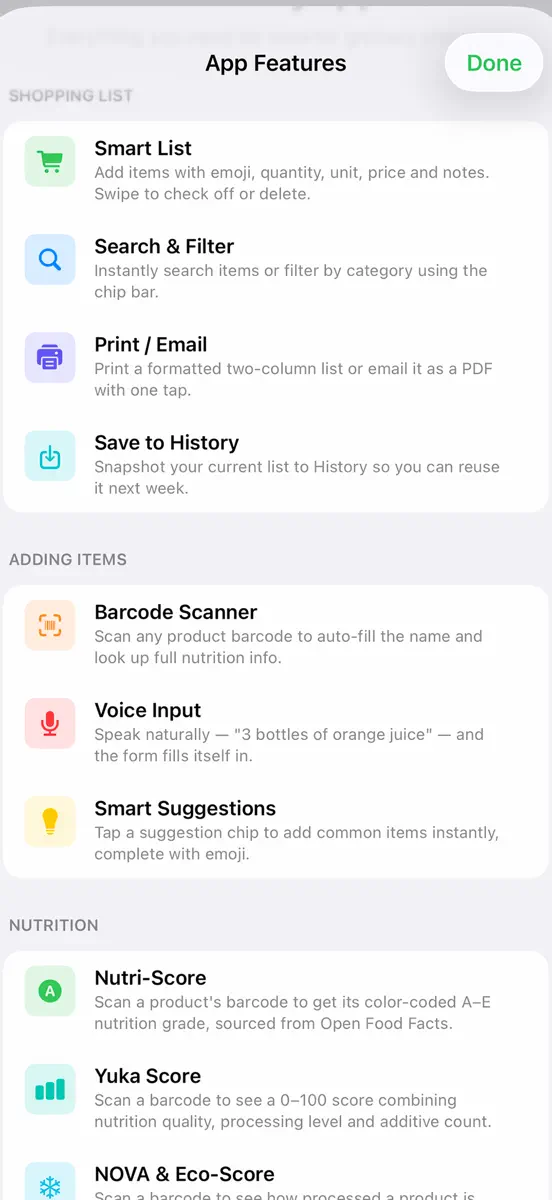
- Add groceries by typing, voice, or quick suggestions.
- Scan product barcodes to look up available nutrition information from Open Food Facts.
- Create and arrange your own categories.
- Check off groceries, search your list, and filter by category.
- Save lists to history and reuse them later.
- Print your grocery list or send it by email.
- Sync lists through iCloud across devices signed in to the same Apple ID.
Recipe photo text recognition happens on your device. For best results, photograph the ingredients section of a printed English recipe and review the text before adding. Voice entry requires microphone and speech recognition permission. Unspecified amounts such as "to taste" stay unchanged when scaling. Earlier scans without recipe labels appear as recipe unknown and cannot be scaled as a named recipe.
Available for iPhone and iPad running iOS 17 or later.
More from Greg Anderson
Their other apps that Appulse has seen in the charts, charting ones first.
| App | Best rank now | Released | App Store |
|---|---|---|---|
ICMPhotoForgePhoto & Video · | Paid · Photo & VideoIndia#26 | ||
BrightroomPhoto & Video · | Paid · Photo & VideoFrance#73 | ||
Lab ChannelsPhoto & Video · | Not charting | ||
PresetCollectionPhoto & Video · | Not charting | ||
DoubleIt CameraPhoto & Video · | Not charting | ||
Vanishing FramePhoto & Video · | Not charting | ||
Infrared CameraPhoto & Video · | Not charting | ||
SlangDecoderUtilities · | Not charting | ||
Ancient LightPhoto & Video · | Not charting |
Ranks come from Apple's public App Store charts, checked once a day. Appulse Index isn't affiliated with Apple.